 Skip to content

Think of marketing dashboard software as your marketing department's command center. It pulls all your scattered data from places like Google Analytics, social media platforms, and your CRM, then displays it all in one clean, visual interface. Instead of staring at endless spreadsheets, you get simple charts and graphs that tell you exactly what’s going on, helping you make smart decisions on the fly—no data science degree required.
What Exactly Is Marketing Dashboard Software?
Ever tried to fly a plane with dozens of separate, disconnected gauges instead of a single, organized cockpit display? It would be chaotic, right? That’s what marketing without a dashboard feels like. You're constantly jumping between Google Ads, Facebook Insights, your email platform, and website analytics, just trying to piece together a coherent picture of your performance.
Marketing dashboard software is that pilot's cockpit for your marketing team. It fixes the fragmentation by pulling all those critical data streams into one clear, visual, and interactive space. You can finally stop drowning in spreadsheets and endless browser tabs and get an at-a-glance view of your entire marketing operation.
This consolidation is absolutely essential today. Modern marketing is a complex mix of channels, and the demand for tools that can make sense of it all is exploding. In fact, the global market for marketing dashboards was valued at USD 5.1 billion in 2024 and is projected to hit USD 12.4 billion by 2033. That growth shows a major shift toward platforms that give teams the real-time insights they need to make strategic calls.
From Raw Data to Actionable Insights
At its core, this software is all about turning overwhelming data into a simple story. It automatically pulls your information, organizes it, and presents it visually with charts, graphs, and scorecards. This process transforms abstract numbers into a clear narrative about what's working and what isn't.
Here’s a great example of a typical business dashboard. Notice how it combines multiple key performance indicators (KPIs) onto a single screen for quick analysis.

This visual approach makes it incredibly easy to spot trends, see which campaigns are knocking it out of the park, and catch potential problems before they get out of hand. You can stop wasting hours exporting reports and immediately see what’s driving results and where your budget should go next.
Key Capabilities of a Marketing Dashboard
While every tool is a little different, the best marketing dashboard software offers a few fundamental capabilities that help teams work smarter. These features are designed to create a single source of truth and make everyone’s job easier.
- Data Integration: They connect directly to dozens of platforms—think social media, ad networks, and CRMs—to automatically pull in all your data. No more manual imports.
- Customizable Visualization: You can build dashboards that are tailored to specific goals, whether you’re tracking campaign ROI, monitoring website traffic, or analyzing social media engagement.
- Automated Reporting: Forget about building reports from scratch every month. You can schedule reports to be sent automatically to stakeholders, saving a massive amount of time.
If you want to dig deeper into how these tools turn raw business data into strategic insights, this SMB's Guide to Data Visualization and Dashboards is a fantastic resource.
Ultimately, the goal isn't just to see your data, but to understand it and act on it. To find a platform that fits your team's specific needs, check out our guide on the top https://reach-influencers.com/marketing-dashboard-tools/ available today.
Why a Centralized Dashboard Is a Game Changer
Let’s get beyond the individual features for a moment. The real magic of marketing dashboard software is how it can completely transform the way your team works day-to-day. Without that central hub, marketers are often just juggling a chaotic mess of data points from different tools, leading to wasted hours and conflicting reports. A centralized dashboard cuts through that noise by creating a single source of truth.
Think about this common scenario: your social media manager is celebrating a campaign with fantastic engagement, but the sales team is seeing a drop in leads from that exact channel. Who's right? This kind of disconnect is what happens when data lives in separate silos. A unified dashboard stitches that story together, showing the full journey from a social click to a final sale. Suddenly, the arguments stop, and collaboration begins around shared, accurate information.
This unified view is what allows for quick, intelligent decisions. Instead of waiting for a weekly report to see what’s working, you get feedback in real time. That speed is a massive competitive advantage, letting you pivot based on market shifts now, not weeks later when the opportunity is long gone.
The Power of Real-Time Adjustments
Let's walk through a real-world example. Imagine your team launches a new PPC ad campaign on Monday morning. A quick glance at the dashboard reveals two things: the cost per acquisition (CPA) for the new ads has shot through the roof, but conversions are flat. At the same time, the dashboard shows an unexpected surge in organic search traffic for a related keyword.
Without a dashboard, you might not catch this for days. With one, the team can act immediately. Before lunch, they’ve already paused the bleeding ad campaign and are reallocating that budget to double down on the organic opportunity—maybe by creating new content or beefing up their SEO for that trending keyword. That single move just saved thousands in ad spend and capitalized on an emerging trend.
This is what modern marketing is all about. It’s less about making big, quarterly bets and more about making small, constant improvements based on live data.
The results of this agility aren't just small wins; they add up to major improvements, as you can see here.
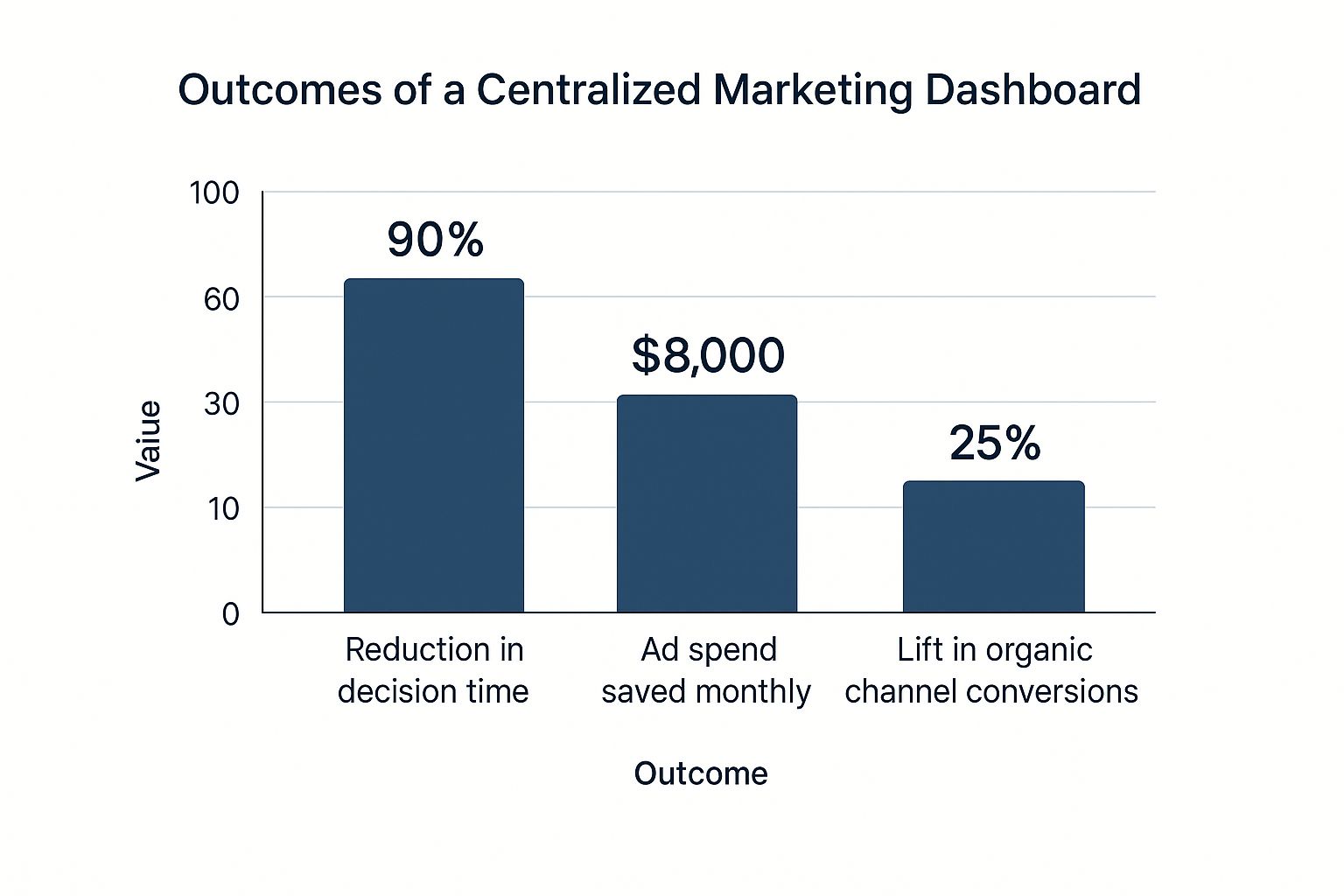
As the numbers show, these aren't just abstract benefits. They translate directly into saving money and boosting performance.
Connecting Actions to Business Results
At the end of the day, a centralized dashboard is a game changer because it’s the engine for truly data-driven marketing strategies. It finally closes the loop between what your team does and the results the business sees, allowing you to prove your ROI with undeniable clarity.
Every marketing leader has been asked to justify their budget. A dashboard makes that conversation incredibly simple.
- Clear ROI Attribution: You can point to a specific ad set on Facebook and show exactly how much revenue it generated. No more guesswork.
- Enhanced Stakeholder Reporting: Forget sending over a clunky spreadsheet. You can share a link to a clean, visual dashboard that any executive can grasp in seconds.
- Team Accountability: With everyone’s eyes on the same KPIs, the entire team is aligned and focused on the same goals. Performance becomes transparent.
Moving from scattered reports to a unified command center does more than just make things efficient. It fundamentally repositions marketing from a cost center to a crucial driver of business growth. You're giving your team the tools to see, understand, and act on data in the moment, creating a more strategic and impactful marketing operation.
Key Features Your Marketing Dashboard Must Have
When you start shopping for marketing dashboard software, it's easy to get overwhelmed by a long list of features. But here’s the thing: not all dashboards are created equal. Knowing what’s truly non-negotiable is how you separate a genuine command center from a glorified spreadsheet.
The best features don't just show you numbers; they give your team the power to act on them. Think of it like buying a car. A premium sound system is nice, but you can't go anywhere without the engine, brakes, and steering wheel. Some features are just that fundamental.
And the demand for these powerful tools is exploding. The global market for marketing dashboard software is expected to jump from USD 5.6 billion in 2025 to a massive USD 12.4 billion by 2032. This growth is all about companies needing to make sense of big data to make smarter decisions—and potentially boost their ROI by up to 30%. You can dig into more of these market projections and insights on OpenPR.
Seamless Multi-Channel Data Integration
This is the absolute foundation. If a dashboard can't do this well, nothing else matters. Your marketing efforts are spread out everywhere—social media, your CRM, SEO tools, email platforms, and ad networks. Without solid integrations, you’re right back where you started: drowning in data silos.
A great dashboard connects to all your essential tools with just a few clicks, automatically pulling in data. No more manual CSV exports or messy uploads. This is how you get a single, unified view of your entire customer journey, from their first click on an ad to the final sale.
Just imagine trying to figure out campaign performance when your Google Ads spend data doesn't connect with your lead data in Salesforce. You'd have no way to accurately calculate ROI or know which channels are actually worth your money. Good integration closes those gaps and creates a single source of truth.
Customization and At-a-Glance Insights
Every business is different, so why should every dashboard look the same? A one-size-fits-all template just doesn't cut it. The best marketing dashboard software gives you highly customizable widgets and layouts, so you can build views for specific roles, campaigns, or business goals.
Your social media manager can have a dashboard zeroed in on engagement, while your CMO gets a high-level view of ROI and customer acquisition cost. To get this level of personalization, look for:
- Drag-and-Drop Interface: Lets you easily build and rearrange your dashboard without needing a developer.
- Variety of Widgets: Gives you a choice of different charts, graphs, tables, and scorecards to tell your data story effectively.
- Role-Based Views: Allows you to create specific dashboards for different team members so they only see what’s relevant to them.
This kind of customization means people can get the answers they need in seconds instead of digging through a mountain of irrelevant numbers. Of course, knowing which digital marketing performance metrics matter for each role is the crucial first step.
The features discussed here are not just "nice-to-haves"; they are the core components that determine whether a dashboard will save you time or waste it. The table below breaks down the most essential features and clarifies the direct impact each one has on your team's day-to-day work and overall effectiveness.
Essential Marketing Dashboard Features and Their Impact
| Feature | Description | Impact on Marketing Efficiency |
|---|---|---|
| Data Integration | Connects to various marketing platforms (e.g., social media, ads, CRM) to pull data into one place automatically. | Eliminates manual data collection, saving hours of work and providing a complete view of performance. |
| Customizable Widgets | Allows users to select different chart types (bar, line, pie) and visual elements to display their data. | Ensures data is presented in the most intuitive format, leading to faster comprehension and better insights. |
| Real-Time Data Refresh | Automatically updates the data at frequent intervals, often every few minutes or hourly. | Enables quick reactions to market changes and performance shifts, preventing wasted ad spend. |
| Automated Reporting | Schedules and automatically sends dashboard reports via email or Slack to key stakeholders. | Frees up the marketing team from repetitive reporting tasks, allowing more time for strategic analysis. |
| Collaboration Tools | Features like annotations, shared links, and alerts that allow teams to discuss data directly within the dashboard. | Fosters a data-driven culture by making it easy for the team to align on insights and next steps. |
Ultimately, a dashboard equipped with these functionalities moves beyond simple data display and becomes an active, strategic asset for the entire marketing organization.
Real-Time Data and Automated Reporting
Marketing moves at lightning speed. An opportunity that’s hot this morning could be cold by this afternoon. Dashboards that only refresh data once a day are essentially showing you yesterday's news. Real-time data refreshes are absolutely critical for making agile decisions.
This capability ensures you're always looking at the freshest information possible, so you can spot trends the moment they start. If a campaign suddenly tanks, you'll know right away and can hit pause before you burn through more of your budget.
Beyond live monitoring, automation is a game-changer. The ability to schedule and automatically email reports to stakeholders can save your team hours of mind-numbing work every single week. Instead of building slide decks, they can spend their time actually analyzing the data and figuring out how to improve performance.
Collaboration and Sharing Tools
Your dashboard shouldn't be a lonely island where one person goes to look at charts. It should be a dynamic workspace where your team can actually work together. The best modern dashboards include features that turn raw data into a productive conversation.
Look for tools that make it easy to:
- Add Annotations: Leave notes right on a chart to point out a key finding or ask your team a question.
- Share Live Dashboards: Give stakeholders a secure link to view the live dashboard instead of sending a static, instantly-outdated PDF.
- Set Alerts: Create custom alerts that notify you or the team via Slack or email when a metric hits a specific high or low.
These features break down communication silos and get everyone on the same page, working from the same set of facts. It’s what turns a simple reporting tool into the true strategic hub for your entire marketing operation.
How to Choose the Right Dashboard for Your Team
Picking the right marketing dashboard can feel like a huge decision, and honestly, it is. But it doesn't have to be a stressful one. The secret is to ignore the flashy sales pitches and focus on what your team actually needs to get the job done. If you approach it systematically, you’ll find a tool that empowers your team, not one that just adds another layer of complexity to their day.
It all starts with a simple, foundational question: What are we trying to measure here? Before you even think about booking a demo, you need to be crystal clear on the key performance indicators (KPIs) that truly matter to your business goals. Are you all about lead gen? Brand awareness? Boosting customer lifetime value? Without that clarity, every dashboard will look shiny and appealing, but none of them will actually be useful.
Assess Your Team's Technical Skills
This is a big one, and it's where a lot of companies go wrong. They buy a super-powerful tool that nobody on the team knows how to use. A dashboard is only valuable if people actually open it and use it. So, you have to be brutally honest about your team's comfort level with technology.
Think about the people who will be in this tool every day. Are they data analysts who live and breathe complex queries? Or are they marketers who just need a simple, intuitive drag-and-drop interface? The goal is to find software that feels natural to the people who will depend on it the most.
- Ease of Use: Is the interface clean and simple to get around in? A clunky, confusing user experience is the fastest way to get your team to abandon a new tool.
- Onboarding and Support: What kind of training and support does the company offer? A fantastic tool with terrible customer service will quickly become a source of major frustration.
- No-Code Functionality: Can your marketers build their own reports without having to bug a developer for help? That kind of self-sufficiency is a game-changer for a fast-moving marketing team.
A dashboard that requires a data science degree to operate will inevitably gather dust. Prioritize a solution that empowers your current team, not one that requires you to hire a new one just to manage it.
Evaluate Integration Capabilities
Your marketing dashboard needs to be the central source of truth, which means it absolutely must connect to all the other tools you're already using. If it can't talk to your CRM, your ad platforms, and your social media tools, you're just creating more data silos—the very problem you're trying to solve.
Before you start shortlisting vendors, make a list of every single platform that holds your marketing data. Don't just think of the big ones like Google Analytics or Facebook Ads. Include everything from your email marketing service to your e-commerce platform.
When you're talking to sales reps, get specific with your questions about integrations:
- Native vs. Third-Party: Do they offer direct, pre-built connections to your tools, or are you going to have to rely on a middleman like Zapier? Native integrations are almost always more stable and reliable.
- Data Sync Frequency: How often does the data get refreshed? For time-sensitive campaigns, you need near real-time data to make smart adjustments on the fly.
- Depth of Integration: Does the connection pull in all the metrics and dimensions you need, or is it just scraping surface-level data? The devil is in the details here.
Consider Scalability and Pricing
Finally, think about the future. Where is your business headed? The dashboard you choose today should be able to grow with you. A tool that's perfect for a small team right now could become a major bottleneck as you add new marketing channels, bring on more team members, or just start dealing with a lot more data.
Look at how the tool handles increasing data volumes and more complex reporting needs. Can you easily add new users and data sources without the price skyrocketing or performance grinding to a halt?
That brings us to the money part. You want a transparent pricing model that makes sense for your growth plans.
- User-Based vs. Usage-Based: Does the price go up for every new team member you add, or is it based on how much data you're pulling?
- Hidden Costs: Are there extra fees for "premium" features, more data sources, or getting a real human on the phone for support?
- Tiered Plans: Take a hard look at their subscription tiers. Does moving up to the next level actually give you value you'll use, or is it just a way to charge you more?
Choosing a scalable tool with a clear, predictable pricing structure will save you the massive headache of having to switch platforms in a year or two. And that will save you a ton of time, money, and frustration down the road.
Putting Your New Dashboard to Work
Getting your hands on a great piece of marketing dashboard software is really just the beginning. The real magic happens when you weave it into the fabric of your team's day-to-day work. This isn't just about plugging in a new tool; it's about shifting how your organization thinks about and uses data. A clumsy rollout can leave you with a complex dashboard that nobody touches, turning a promising investment into expensive digital shelfware.
The trick is to think of implementation as a cultural change, not just a tech setup. If you want this new tool to become an indispensable part of your workflow, you need a practical roadmap. The goal is to show its value quickly and get people on board naturally. Whatever you do, resist the urge to build one giant, all-encompassing dashboard. That approach almost always backfires, overwhelming everyone with a tidal wave of information.
Instead, start small. A tightly focused pilot project can deliver a quick win and build the momentum you need to get the rest of the company excited.
Define Clear Objectives and Role-Specific KPIs
Before you even think about building your first widget, stop and ask the most critical question: "What decisions will this dashboard actually help us make?" Your answer should be the North Star for every choice that follows. Different teams have different worlds they live in, and your dashboards need to reflect that. The brand team is obsessed with reach and engagement, while the lead gen folks only care about conversion rates and CPA.
To build dashboards that deliver instant clarity, you have to tailor them.
- For the SEO Team: They need to see organic traffic, keyword rankings, and backlink growth front and center. These are the metrics that map directly to their daily grind.
- For the Social Media Team: Focus on engagement rates, follower counts, and click-throughs from their posts. If you want to dive deeper, our guide on building a social media analytics dashboard has you covered: https://reach-influencers.com/social-media-analytics-dashboard/
- For the C-Suite: They don't have time for the nitty-gritty. Give them a high-level executive summary of marketing ROI, customer acquisition cost (CAC), and total pipeline value.
This targeted approach means that the moment someone logs in, they see data that's relevant and actionable to them. That’s how a dashboard goes from being a chore to an essential part of the workday.
The goal isn't just to show data; it's to provide answers. A great dashboard should tell you what you need to know in about five seconds, letting you make a smarter decision without getting lost in a sea of numbers.
Start Small and Scale for Maximum Impact
Once your objectives are clear, fight the temptation to roll the dashboard out to the entire company at once. Start with a pilot project and a small, enthusiastic team. This gives you a safe space to iron out the kinks, show some tangible results, and create internal champions who will sing the tool's praises for you.
This phased approach minimizes risk and builds a strong foundation for success. Modern marketing dashboards have become strategic assets because they can pull in data from everywhere and offer smart, AI-driven insights. From retail to healthcare, entire industries rely on these tools for everything from customer journey mapping to social media analysis. You can find more data on the growing global marketing dashboard software market on ResearchAndMarkets.com. Your implementation should be just as strategic—deliberate, focused, and all about delivering value.
By starting with one team and one clear goal, you can prove the software's ROI fast. Once that first group has a success story to tell, it becomes a powerful internal case study, making it infinitely easier to get the rest of the organization on board.
Common Questions About Marketing Dashboards
https://www.youtube.com/embed/nCrD5g8d3ow
Even after seeing all the benefits, it's natural to have a few questions before you jump in. We get it. Let’s tackle some of the most common ones that come up when teams are considering a marketing dashboard for the first time.
Think of this as your quick-start guide to clearing up any confusion, from the technical side of things to proving the software's value to the people holding the purse strings.
Is This Different from a BI Tool Like Tableau?
Yes, and the difference is a big deal for marketers. While both tools can create charts and graphs, marketing dashboards are built specifically for our world. They come out of the box with ready-made connections to the platforms we live in every day—think Google Ads, Facebook, and HubSpot. This means you can get up and running in minutes, not weeks.
A general-purpose Business Intelligence (BI) tool like Tableau is incredibly powerful, but it’s more of a blank canvas. To get it to work, you usually need a data analyst or developer to connect all the sources and build every single report from the ground up. It’s the difference between a specialized, ready-to-go power tool and a massive, complex toolkit that requires an expert to even open the box.
How Technical Do I Need to Be?
You really don't need to be a tech wizard. Most modern marketing dashboard software is designed for marketers, not engineers. They lean heavily on intuitive drag-and-drop interfaces and have simple, guided walkthroughs to connect your accounts. The goal is to let you build powerful reports without having to put in a ticket with the IT department.
Sure, if you want to get into some super-advanced custom metrics, you might need to dig a little deeper. But for 99% of what you'll need to do, the core features are built for people whose main job is marketing, not coding.
The whole point of this software is to put you back in control. It's about giving marketers direct access to their own data, breaking down technical walls so you can spend your time on strategy and growth, not fighting with spreadsheets and APIs.
Can a Dashboard Track Campaign ROI?
Absolutely. In fact, this is one of its most critical jobs. A good marketing dashboard software pulls in cost data from your ad platforms and marries it with conversion and sales data from your analytics tools or CRM.
The result? You get a crystal-clear, real-time view of which campaigns are actually making you money and which are just burning cash. This lets you shift your budget from what isn't working to what is, maximizing your returns and giving you hard numbers to prove marketing’s impact on the bottom line.
How Do I Trust the Data in My Dashboard?
Trust in your data all comes down to a solid setup. The first step is making sure your data sources are connected properly and that the original platforms (like Google Analytics) are configured to track your goals accurately from the start. Garbage in, garbage out, as they say.
A great habit to get into is periodically spot-checking your dashboard numbers against the native platform's reporting. Just pull up a few key metrics in both places to make sure they match. The best tools also have built-in data validation features to flag any issues, so you can always feel confident that the numbers you’re sharing with your boss are the right ones.
Ready to centralize your influencer marketing analytics and prove your ROI with a powerful, intuitive dashboard? REACH provides all the tools you need to manage campaigns, track performance, and generate impressive reports. Start simplifying your workflow with REACH today!
