 Skip to content


Juggling content approvals, client feedback, and campaign schedules across endless email threads and spreadsheets is a recipe for missed deadlines and creative burnout. The right social media collaboration tools transform this chaotic process into a streamlined, efficient workflow. These platforms give your team the power to plan, approve, and publish content seamlessly, whether you're an agency, an in-house brand, or a group of creators.
The real challenge isn't knowing you need a better system; it's finding the right one among dozens of options. This guide cuts through the noise. We've compiled a comprehensive list of the 12 best platforms designed to simplify your social media management. For each tool, we provide a detailed breakdown of its ideal use case, key features, pricing, and honest limitations, complete with screenshots and direct links.
Our goal is to help you find the perfect fit for your specific needs. While many tools focus on scheduling, a specialized influencer marketing platform like REACH Influencers offers an end-to-end solution for managing creator partnerships—a critical and often-overlooked aspect of social collaboration. By centralizing your workflow, these tools help you manage multiple social media accounts effortlessly and avoid team burnout.
Get ready to find the perfect social media collaboration tools to scale your efforts and reclaim your team's valuable time. Let’s dive in.
Table of Contents
- 1. REACH Influencers
- 2. Sprout Social
- 3. Hootsuite
- 4. Buffer
- 5. Later
- 6. Loomly
- 7. Planable
- 8. Agorapulse
- 9. SocialPilot
- 10. CoSchedule
- 11. HeyOrca
- 12. G2
- Comparison Table
- How to Choose the Right Tool
1. REACH
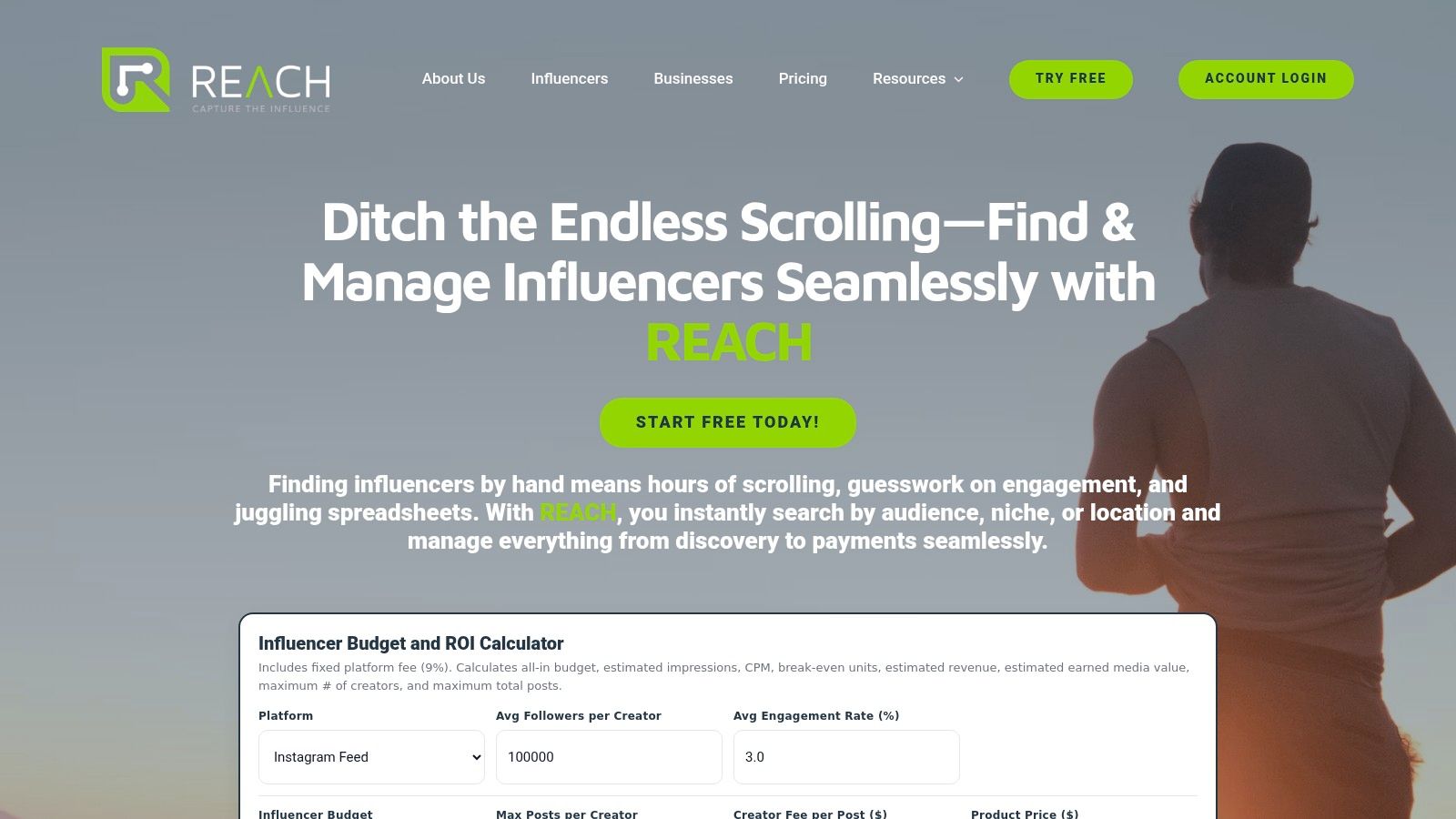
REACH emerges as a powerful, all-in-one solution specifically engineered to master the complexities of influencer marketing. While many social media collaboration tools focus broadly on content scheduling and team approvals, REACH zeroes in on the entire influencer partnership lifecycle. It offers a sophisticated, end-to-end platform that transforms how brands, agencies, and creators connect and execute campaigns. This specialized focus makes it an indispensable asset for teams aiming to scale their influencer programs with precision and demonstrable ROI.
Its core strength lies in its ability to consolidate fragmented workflows into a single, cohesive hub. From discovering the perfect micro-creator or A-list talent to managing contracts, processing secure payments, and tracking real-time performance, REACH eliminates the need for cumbersome spreadsheets and disjointed communication channels. For any team serious about moving beyond manual processes and into scalable, data-driven influencer collaborations, this platform is a standout choice.
Key Differentiators and Use Cases
What truly sets REACH apart is its focus on measurable outcomes and agency-grade functionality. The platform is not just a discovery tool; it's a comprehensive campaign management and reporting engine.
- For Agencies: The ability to run unlimited client projects and deliver fully white-labeled reports is a significant advantage. This allows agencies to present a professional, branded experience to clients while efficiently scaling operations without adding overhead. For example, a marketing agency can use REACH to manage ten different client campaigns simultaneously, providing each with custom-branded performance dashboards that highlight key metrics like EMV and clicks.
- For Brands: Direct-to-consumer (DTC) brands benefit immensely from the built-in budget and ROI calculator. This tool, combined with real-time click tracking and earned media value metrics, provides the hard data needed to justify spend and prove campaign impact to stakeholders. A brand could see in real-time that a specific influencer is driving a 5x return on ad spend, allowing them to double down on that partnership immediately.
- For Creators: The platform offers a transparent and secure environment. Guaranteed fast payouts and direct access to brand and agency partners remove common friction points, allowing creators to focus on what they do best: creating authentic content.
Pricing and Access
REACH offers a free trial without requiring a credit card, allowing teams to explore its features firsthand. Its pricing model appears to be transparent and performance-based. The on-site budget calculator indicates a 9% platform fee, suggesting a cost structure that scales with your campaign spend rather than relying on fixed, per-seat licenses. This model can be particularly cost-effective for teams with fluctuating campaign volumes.
Pros & Cons
| Pros | Cons |
|---|---|
| Laser-Targeted Discovery: Find ideal influencers quickly with advanced filters for niche, engagement, location, and audience. | Percentage-Based Fee: The 9% platform fee may become a significant cost on very large-scale campaigns. |
| End-to-End Campaign Hub: Centralizes outreach, approvals, contracts, payments, and real-time reporting in one place. | Limited Public Social Proof: Fewer public case studies or awards compared to legacy platforms, requiring a demo for validation. |
| Agency-Ready Features: Includes unlimited client projects and fully white-labeled reporting capabilities. | |
| Performance-First Analytics: Provides ROI calculators, click tracking, and earned media value to prove campaign impact. |
Learn more at reach-influencers.com
2. Sprout Social: An Enterprise-Level Social Media Collaboration Tool
Sprout Social is an enterprise-grade platform designed for mid-market and large organizations needing robust social media collaboration tools. It excels in managing complex workflows across multiple teams, departments, and even external stakeholders, making it a powerful choice for businesses that have outgrown simpler tools.
Its core strength lies in its highly structured collaboration and approval systems. You can create multi-step approval chains that require sign-off from specific individuals or entire teams before a post goes live. This granular control is essential for regulated industries or brands with strict compliance and messaging guidelines.
Key Collaboration Features & Use Case
Sprout Social centralizes team activity into a unified environment. The Smart Inbox gathers all incoming messages into one stream, where managers can assign tasks to specific team members to ensure no comment or question is missed. The shared content calendar provides a complete overview of all scheduled posts across every network.
A standout feature is the ability to include external collaborators in the approval process via a simple email link. A client or legal partner can review and approve content without needing a full Sprout Social account, streamlining feedback from key decision-makers outside your immediate team. This level of control makes it one of the most comprehensive social media management tools for agencies.
| Feature Highlights | Best For |
|---|---|
| Multi-step approval workflows | Teams with strict legal or brand compliance needs |
| Unified Smart Inbox | High-volume community management |
| External approver links | Agencies collaborating with clients |
| Deep analytics & reporting | Data-driven teams measuring ROI |
Pricing and Limitations
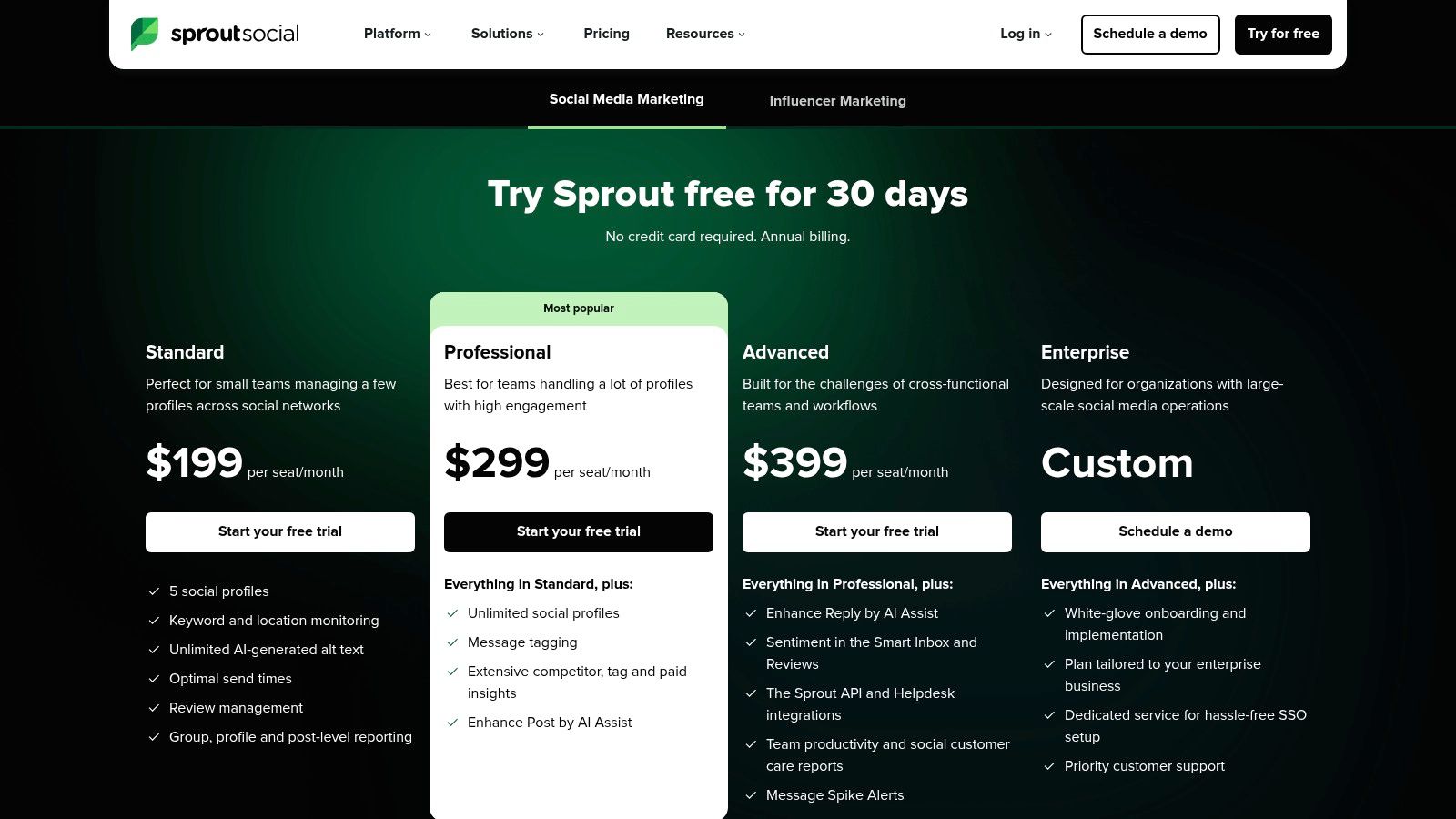
Sprout Social's pricing is user-based, starting with the Standard plan at $249 per user/month. The Professional plan, which includes more advanced features, is $399 per user/month. While powerful, this per-seat model can become expensive for large teams. Additionally, some of its most advanced features are reserved for the highest-tier plans, which may be out of reach for smaller businesses.
Visit Sprout Social to see plan details.
3. Hootsuite
Hootsuite is one of the most established all-in-one social media platforms, serving a wide range of users from small businesses to large enterprises. Its longevity has resulted in a vast ecosystem with extensive integrations, making it a reliable choice for teams that need a central hub for scheduling, monitoring, and reporting.
The platform is particularly known for its powerful scheduling capabilities and robust analytics. For teams, its collaboration tools are built to streamline content creation and message response, ensuring a consistent brand voice across all channels.
Key Collaboration Features & Use Case
Hootsuite’s collaborative features are designed for practical, day-to-day social media management. The shared inbox allows team members to view, assign, and reply to incoming messages and mentions from one place, preventing duplicate responses and missed opportunities. Approval workflows allow managers to review and sign off on posts before they are published.
A key advantage is its integration with tools like Canva and its built-in AI content creator, which helps teams generate captions and ideas efficiently. The "Best Time to Publish" recommendations also help optimize content scheduling for maximum engagement. This combination makes it an excellent social media collaboration tool for teams focused on content velocity and performance.
| Feature Highlights | Best For |
|---|---|
| Request/require approval workflows | Teams needing manager oversight before publishing |
| Shared inbox & assignments | Efficiently managing customer service and engagement |
| AI captioning & content aids | Scaling content creation efforts quickly |
| Extensive app integrations | Businesses with an established marketing tech stack |
Pricing and Limitations
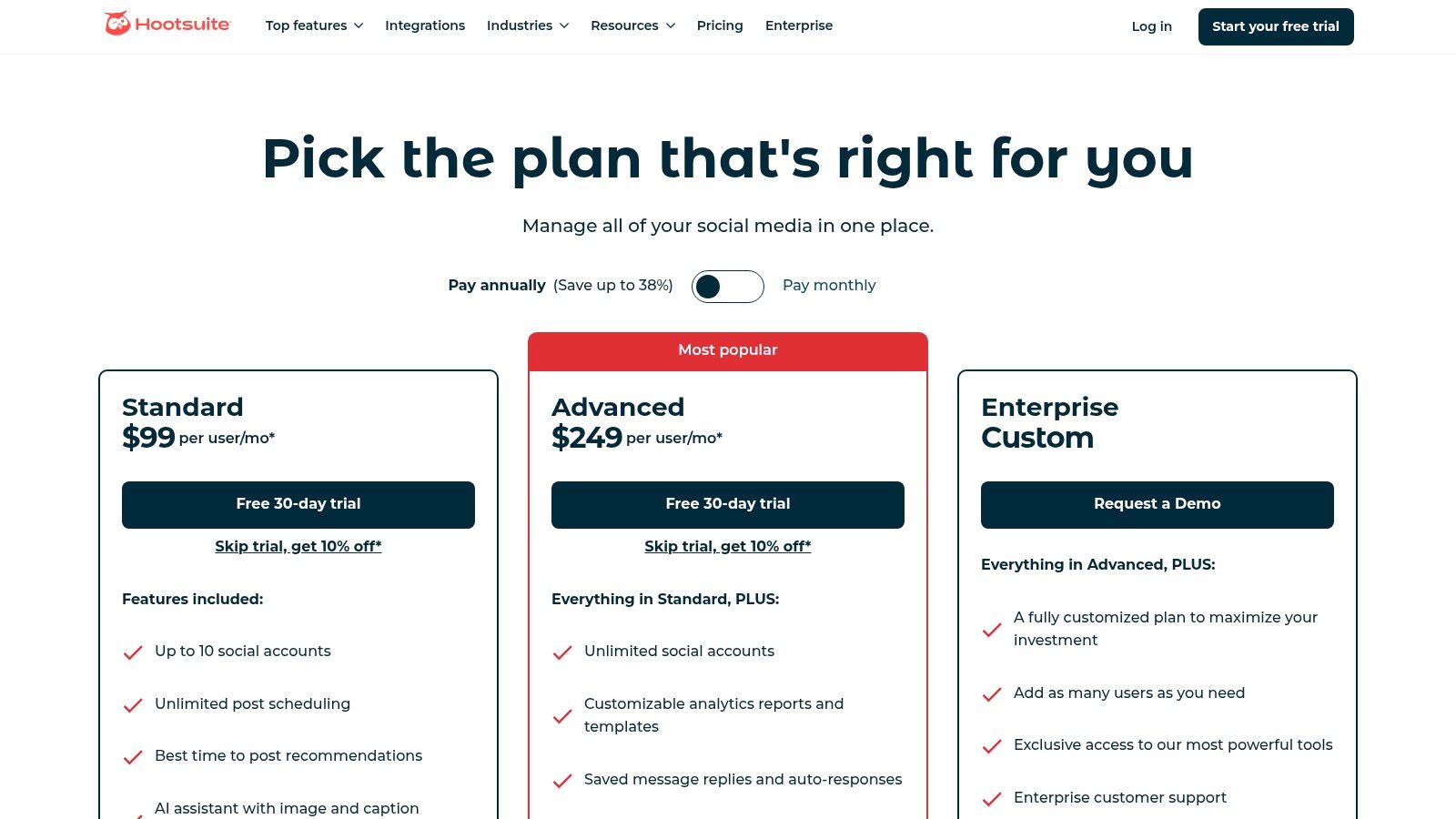
Hootsuite offers a 30-day free trial. Paid plans begin with the Professional plan at $99 per month for one user and three social profiles. Team collaboration features are included in the Team plan at $249 per month for three users. While powerful, pricing can become complex as costs increase with additional users and add-ons. Some of the most advanced features, like social listening and competitor benchmarking, are reserved for higher-tier Business or Enterprise plans.
Visit Hootsuite to see plan details.
4. Buffer
Buffer is a streamlined and intuitive platform designed for small teams, creators, and businesses looking for straightforward social media collaboration tools. It prioritizes simplicity and ease of use, making it an excellent starting point for those who need essential scheduling, approval, and reporting features without the complexity of enterprise-level software.
Its primary appeal lies in its clean interface and a "per-channel" pricing model, which offers flexibility. Instead of paying per user, you pay for the number of social media accounts you connect. This makes Buffer a cost-effective choice for small teams managing a handful of profiles who need to collaborate on content creation and scheduling.
Key Collaboration Features & Use Case
Buffer enables teams to work together efficiently within a shared dashboard. You can invite team members and assign them access levels like "Admin" or "Full Posting Access," ensuring junior members can draft posts that require approval before going live. The shared content calendar visualizes the entire publishing schedule, preventing overlaps and content gaps.
A key feature is its simplicity in the approval process. A team member can create a post and save it as a draft, which a manager can then review, edit, and approve directly within the platform. While it lacks the multi-step, granular workflows of more advanced tools, this simple draft-and-approve system is perfect for small businesses and agencies that need a basic but effective safety net.
| Feature Highlights | Best For |
|---|---|
| Simple draft & approval workflows | Small teams needing a basic content review process |
| Per-channel pricing model | Businesses with few social profiles but multiple users |
| Shared content calendar | Coordinating publishing schedules across a small team |
| Start Page (link-in-bio tool) | Creators and brands driving traffic from social bios |
Pricing and Limitations
Buffer's pricing starts with a free plan for up to three channels. Paid plans are modular, beginning with the Essentials plan at $6 per channel/month. This allows you to build a custom plan based on your needs. However, the costs can add up quickly if you manage numerous social media accounts across multiple clients.
While highly user-friendly, Buffer's collaboration features are not as robust as enterprise solutions. It lacks advanced task assignment, deep analytics for team performance, and complex compliance workflows, making it less suitable for large organizations or highly regulated industries.
Visit Buffer to see plan details.
5. Later
Later is a visually-focused platform renowned for its intuitive interface, making it a top choice for brands where aesthetics are paramount. Its strength lies in planning content for visual networks like Instagram and TikTok, but it has evolved to include powerful social media collaboration tools suitable for both in-house teams and agencies managing client approvals.
The platform simplifies the content lifecycle, from planning and scheduling to review and publication. Its clean, calendar-based layout allows teams to see exactly how their feed will look, ensuring brand consistency. For teams that prioritize visual storytelling, Later provides a streamlined environment to manage content without the complexity of more enterprise-focused systems.
Key Collaboration Features & Use Case
Later's collaboration features are designed for simplicity and efficiency. Team members can leave notes directly on scheduled posts, add labels for easy filtering, and manage user-generated content (UGC) seamlessly. The platform provides a shared media library, preventing asset duplication and ensuring everyone works from the correct version.
A key feature for agencies is the ability to share a content calendar for external review. A client can receive a link to view, approve, or reject upcoming posts without needing to log in to the platform. This frictionless approval process saves significant time and keeps projects moving forward, making it an excellent tool for managing client feedback on visual content.
| Feature Highlights | Best For |
|---|---|
| Visual content planner | Instagram-first brands and visual storytellers |
| External share-for-review links | Agencies needing simple client approval workflows |
| Centralized media library | Teams needing to organize and access assets |
| UGC collection tools | Brands that leverage user-generated content |
Pricing and Limitations
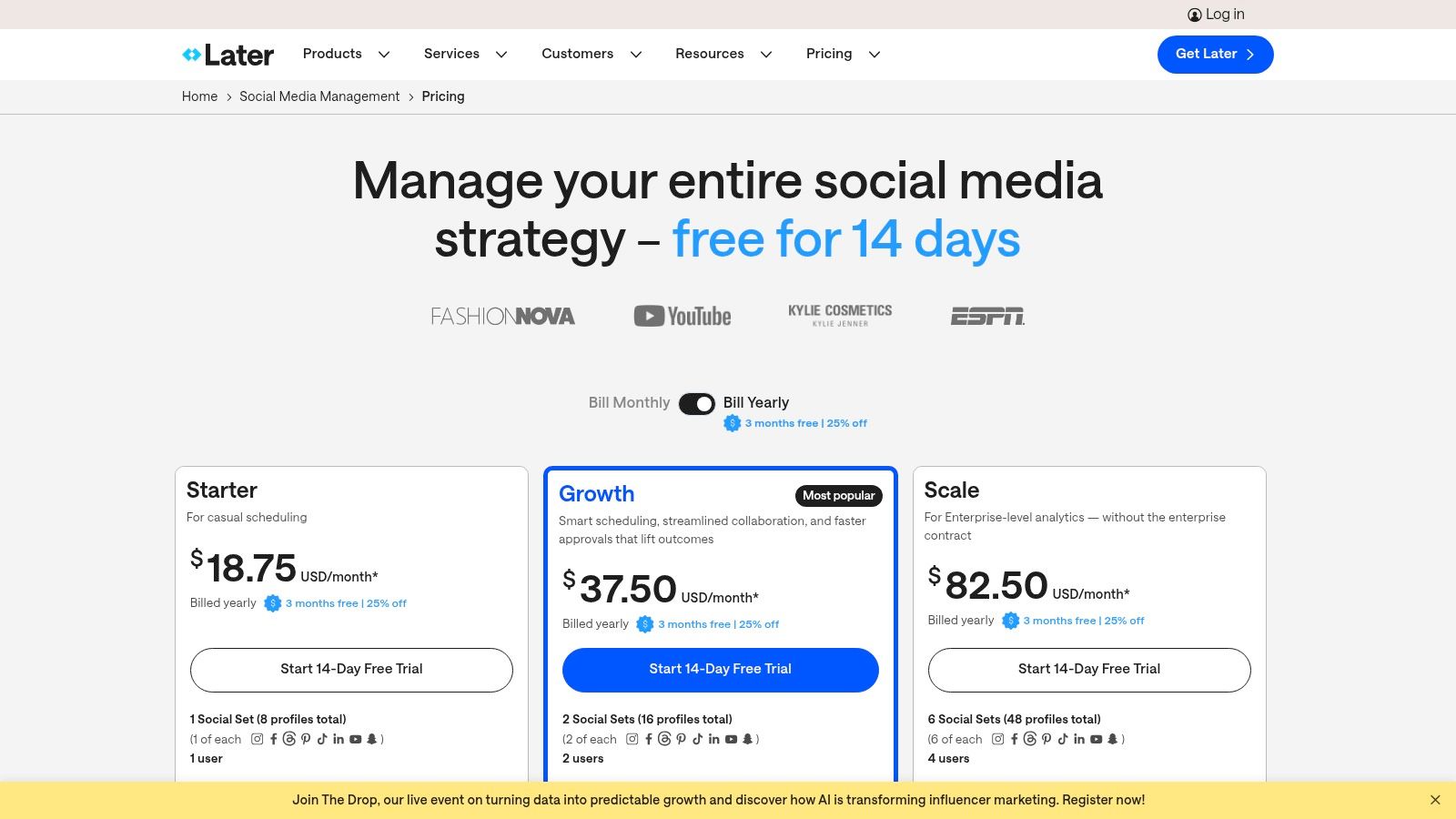
Later offers a free plan with basic scheduling features for one user. Paid plans with collaboration tools start with the Starter plan at $25/month. The Growth plan, which includes more robust analytics and team features, is $45/month. While its visual planner is best-in-class, its analytics and reporting are less comprehensive than enterprise-level tools. Power users or data-heavy teams might find they outgrow its capabilities.
Visit Later to see plan details.
6. Loomly
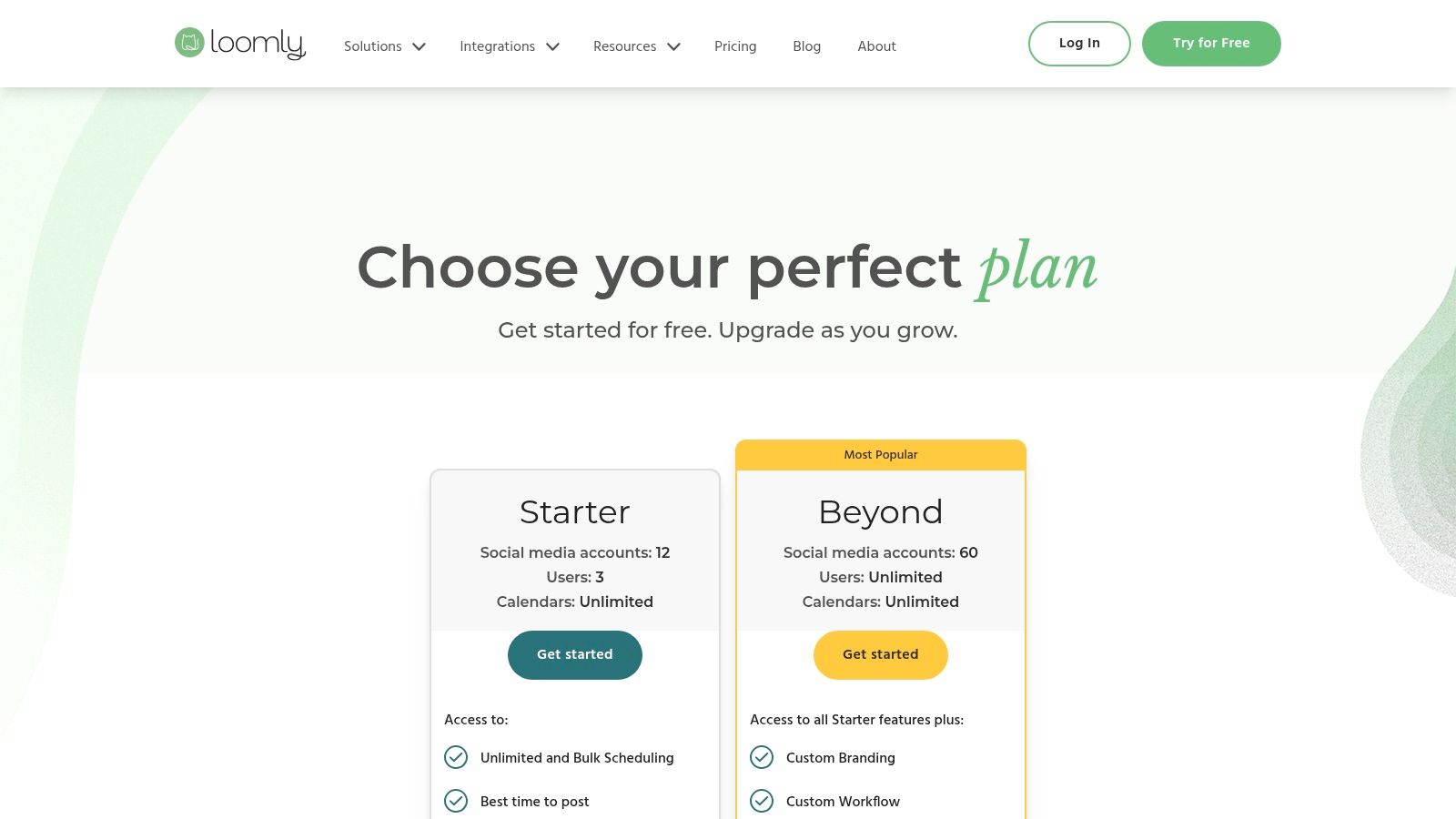
Loomly is a social media planning platform built from the ground up with collaboration at its core. It is particularly well-suited for agencies and brands that require granular control over content creation and approval, offering a highly structured yet intuitive environment for teams to work together on their social media strategy.
The platform's strength is its calendar-centric approach, combined with sophisticated, role-based permissions and multiple approval workflow styles. This makes it an excellent choice for teams that need to manage content for various clients or departments while keeping internal and external feedback loops clean and organized. Loomly excels at ensuring every piece of content passes through the correct channels before publication.
Key Collaboration Features & Use Case
Loomly’s approval system is its most powerful feature. It offers several predefined workflows (Original, Lite, Zero) and allows for fully Custom Workflows on higher-tier plans. These can be configured with specific triggers and guards, ensuring a post moves seamlessly from a contributor to an editor and finally to a client for sign-off.
The platform provides distinct, per-brand calendars, which is a major benefit for agencies managing multiple accounts. Role-based access is also incredibly granular, with default roles like Owner, Editor, and Contributor, plus a dedicated "Client" role that prevents them from seeing internal team comments. Notifications via Slack and Microsoft Teams integrations keep the entire team updated on post statuses, making Loomly one of the most organized social media collaboration tools available.
| Feature Highlights | Best For |
|---|---|
| Custom approval workflows | Teams with multi-stage review processes |
| Role-based access controls | Agencies managing client approvals securely |
| Per-brand content calendars | Managing multiple brands or departments |
| Slack & Teams notifications | Keeping teams aligned on content status |
Pricing and Limitations
Loomly’s pricing is based on the number of users and calendars. The Base plan starts at $42/month for 2 users and 10 social accounts. The Standard plan, at $84/month, adds more advanced features. However, the most powerful collaboration tools, like custom roles and custom workflows, are reserved for higher-tier plans. Large teams may find the enterprise-level plan necessary, which can increase costs.
Visit Loomly to see plan details.
7. Planable
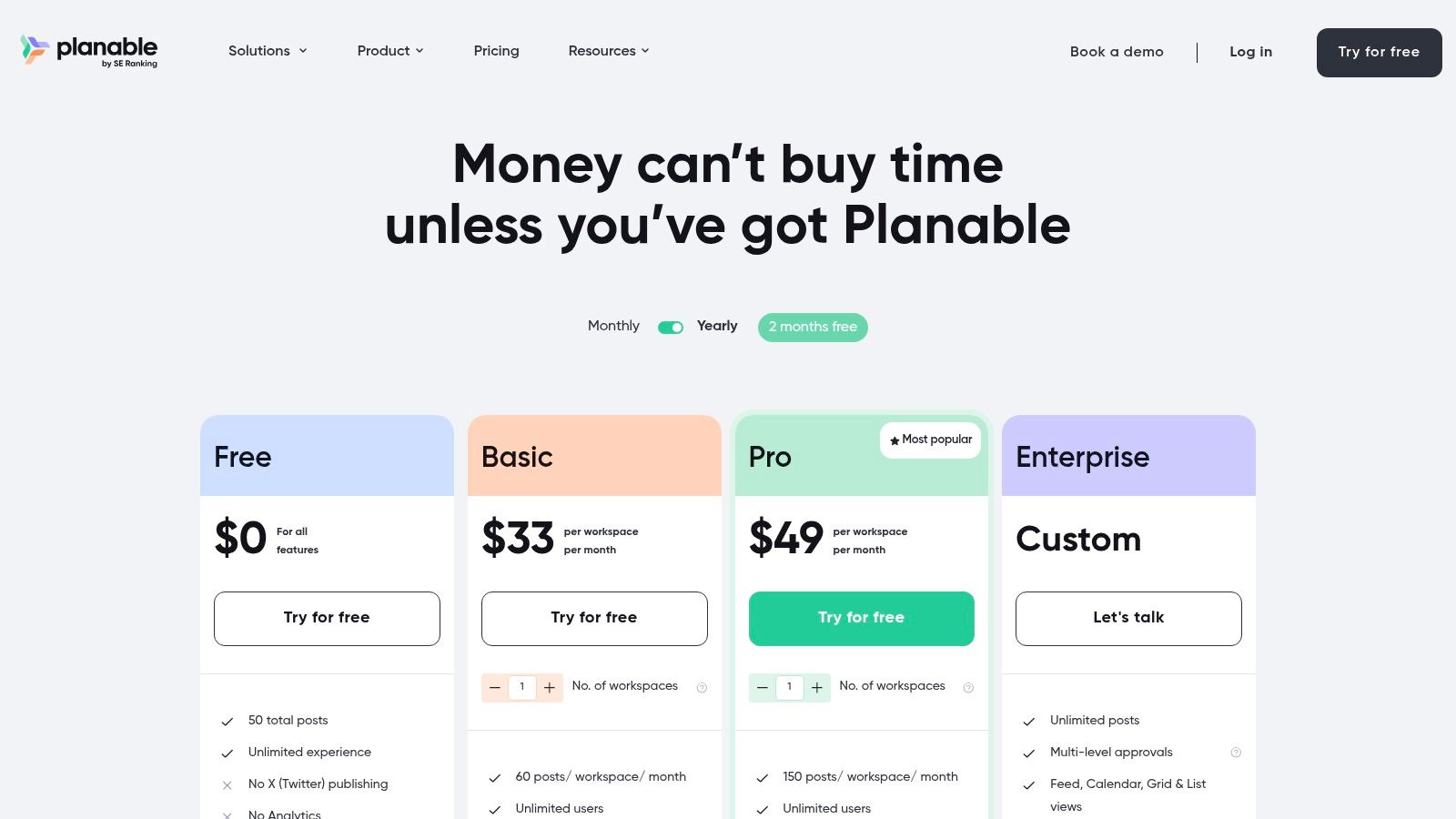
Planable is a social media collaboration tool built specifically to streamline the content review and approval process. It's designed for teams, particularly agencies, that need a fast, visual, and straightforward way to get feedback and sign-offs from clients and internal stakeholders without the clutter of more complex, all-in-one platforms.
Its main appeal is a collaboration-first approach. Instead of treating approvals as a feature, Planable makes them the core of the workflow. The platform offers a clean, pixel-perfect preview of how posts will look on each social network, allowing collaborators to leave comments directly on the mock-up. This visual context eliminates the misunderstandings that often happen with spreadsheet-based content planning.
Key Collaboration Features & Use Case
Planable excels at creating a frictionless feedback loop. Comments can be marked as internal for team discussions or shared with clients, keeping conversations organized. The platform offers multiple approval types, from optional to required, and even multi-level approval flows for enterprise needs. This ensures every piece of content gets the right eyes on it before publishing.
A significant advantage is its pricing model, which offers unlimited users on all paid plans. This makes it an incredibly cost-effective solution for agencies or large teams that would otherwise face high per-seat costs. For teams looking for a more comprehensive set of tools, Planable fits well alongside other marketing collaboration software, allowing you to build a specialized tech stack.
| Feature Highlights | Best For |
|---|---|
| Unlimited users on paid plans | Agencies and teams with predictable budget needs |
| Pixel-perfect content previews | Reducing feedback rounds and miscommunication |
| Multi-level approval workflows | Teams with complex compliance or brand reviews |
| Internal & client-facing comments | Organizing team and stakeholder conversations |
Pricing and Limitations
Planable offers a free plan for getting started. Paid plans begin with the Basic plan at $11 per user/month (billed annually). The key differentiator is that plans are priced per workspace, and paid plans include unlimited users. However, core features like analytics and a unified inbox are add-ons in lower-tier plans. Additionally, the free plan does not support publishing to X (formerly Twitter).
Visit Planable to see plan details.
8. Agorapulse
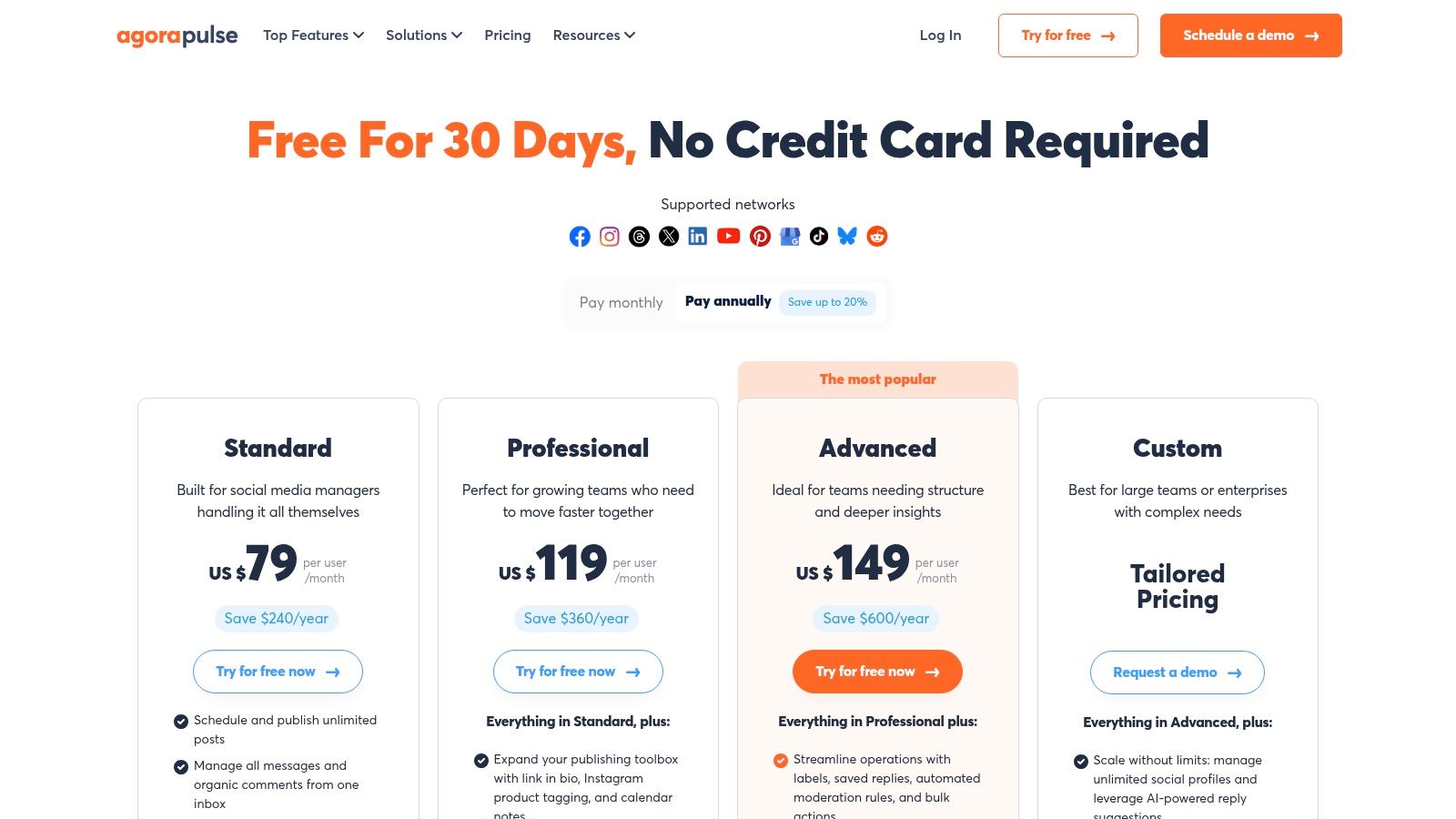
Agorapulse is a comprehensive social media management suite that balances powerful features with a user-friendly interface. It's an excellent choice for teams that need robust collaboration tools, particularly a unified inbox and straightforward approval workflows, without the enterprise-level complexity or cost of some alternatives. The platform is known for its transparent pricing and strong customer support.
Its strength lies in providing an all-in-one solution that combines publishing, reporting, and a highly efficient social inbox. You can send posts for approval to internal teammates or external collaborators, ensuring brand messaging stays consistent before anything goes live. This makes it a solid contender among social media collaboration tools for SMBs and agencies.
Key Collaboration Features & Use Case
Agorapulse is built around a centralized workflow designed to save time. The shared publishing calendar gives everyone a clear view of the content pipeline, while the social inbox aggregates comments, mentions, and DMs into a single, manageable stream. You can assign conversations to specific team members to ensure timely responses.
For collaboration, you can assign user roles with specific permissions and create simple approval loops. An optional setting requires every designated user to approve a post before it can be published, adding a layer of security. While basic approvals are available on standard plans, more complex multi-step workflows are reserved for the Custom plan.
| Feature Highlights | Best For |
|---|---|
| Simple approval workflows | Teams needing a straightforward review process |
| Unified social inbox | Efficient community management and support |
| Shared content calendar | Content planning and team visibility |
| External collaborator access | Agencies working directly with clients for approvals |
Pricing and Limitations
Agorapulse offers several tiers, with its Standard plan starting at $49 per user/month when billed annually. The per-user pricing model can become costly for larger teams on its core plans. A significant limitation is that advanced, multi-step approval workflows are only available on its highest-tier Custom plan, which requires a custom quote.
Visit Agorapulse to see plan details.
9. SocialPilot
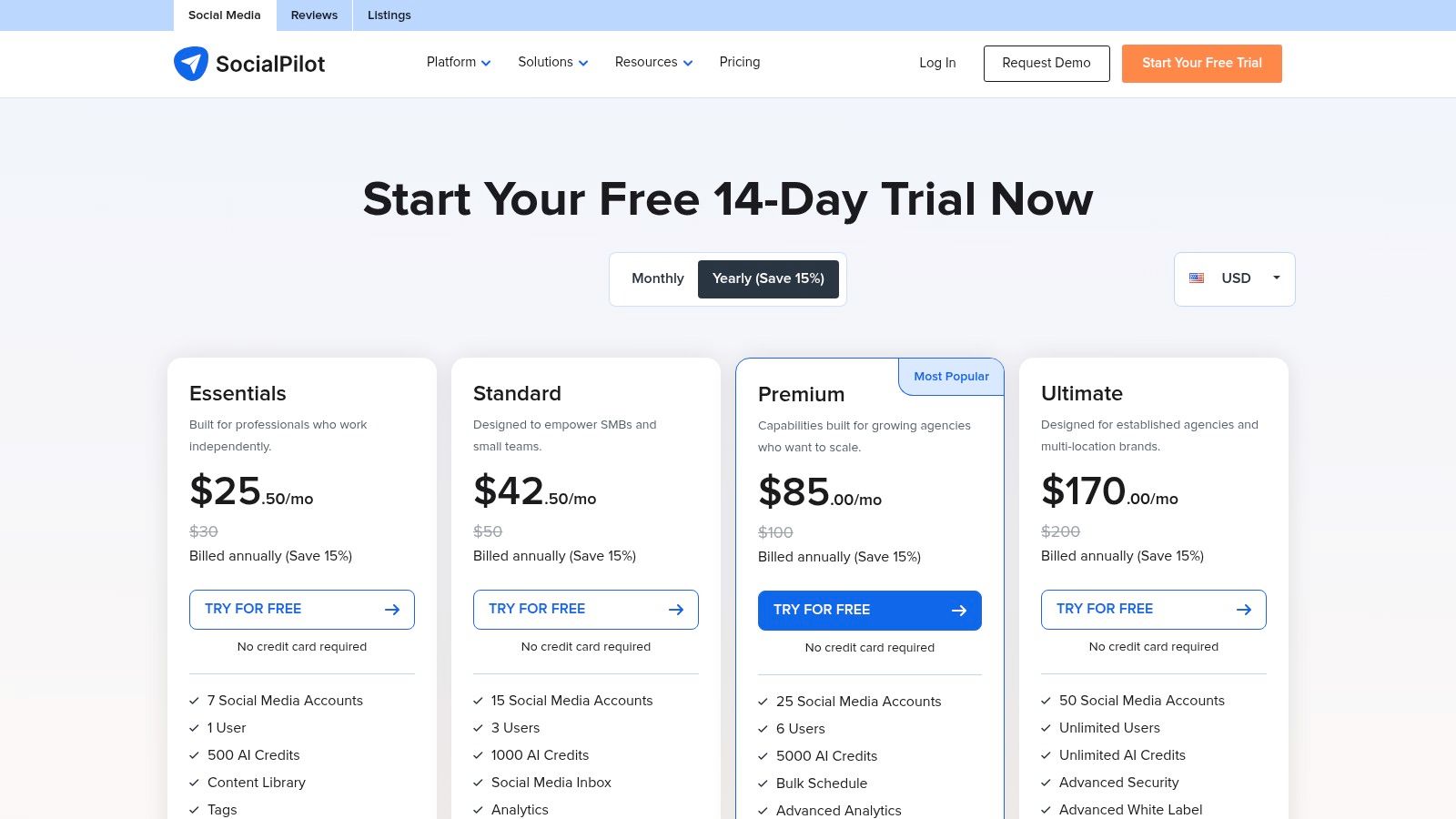
SocialPilot is a budget-friendly social media management platform that offers surprisingly robust collaboration features for small to medium-sized businesses and growing agencies. It strikes a balance between affordability and functionality, providing essential team management tools without the enterprise-level price tag of its larger competitors. Its main appeal is offering scalable user and account limits at a very competitive price point.
The platform is designed for practical, day-to-day social media management. It allows managers to set specific roles and permissions for team members, ensuring that junior staff can draft content while senior managers retain final approval. This makes it an effective tool for maintaining brand consistency across a growing team.
Key Collaboration Features & Use Case
SocialPilot centralizes workflows around a shared content calendar and an intuitive approval system. Team members can submit posts for review, and managers are notified to either approve, reject, or edit them before scheduling. For agencies, the higher-tier plans include a client management feature where clients can securely log in to review and approve their dedicated content queue.
While its UI is more utilitarian than premium suites, its efficiency is a key strength. Features like bulk scheduling allow teams to upload and schedule hundreds of posts at once from a single CSV file, a massive time-saver for content-heavy campaigns. The combination of team roles, client approvals, and white-label reporting on upper tiers makes SocialPilot one of the best value-for-money social media collaboration tools for agencies on a budget.
| Feature Highlights | Best For |
|---|---|
| Team roles & manager approvals | SMBs managing an in-house social media team |
| Client approval portals | Agencies needing a simple client review process |
| Bulk scheduling via CSV | Teams managing high-volume content calendars |
| White-label reports | Agencies looking to brand their client deliverables |
Pricing and Limitations
SocialPilot's pricing is highly competitive, starting with the Professional plan at $25.50/month (billed annually) for one user. The Agency plan, ideal for collaboration, is $85/month and includes multiple users and client management features. While its core features are strong, the user interface can feel less polished compared to more expensive platforms. Furthermore, some advanced features like white-labeling and client portals are reserved for the higher-tier plans.
Visit SocialPilot to see plan details.
10. CoSchedule (Social/Agency Calendar)
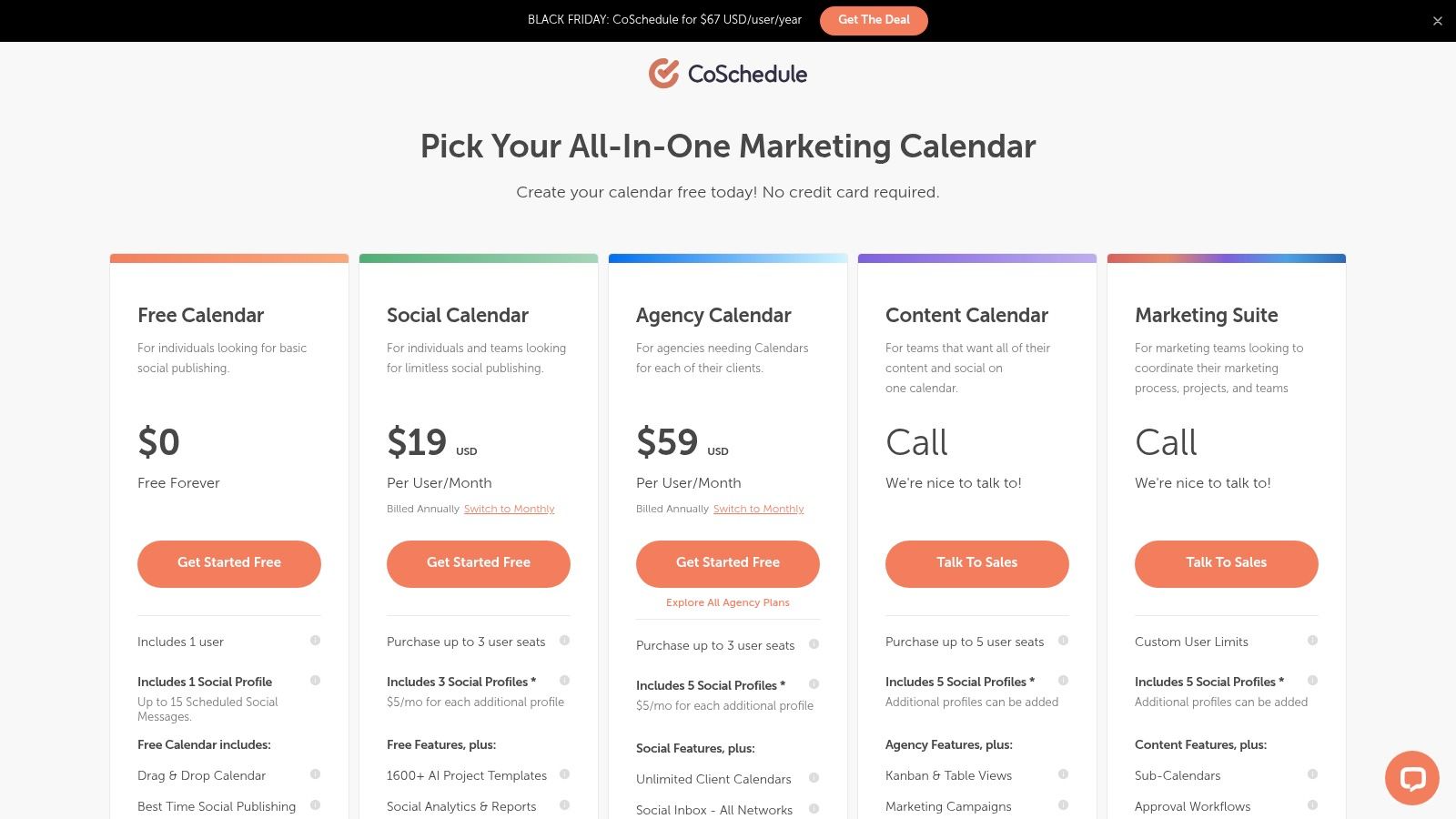
CoSchedule is a marketing calendar platform that excels at uniting content strategy and social media execution in one place. Its strength lies in its calendar-centric workflow, which provides a master view of all marketing activities, from blog posts to social campaigns. This makes it one of the best social media collaboration tools for teams that want to see how their social efforts align with broader content initiatives.
Its design is ideal for marketing agencies and content-heavy teams. You can organize separate calendars for different clients or projects, manage approval processes, and use automation to keep your social queues full. The platform bridges the gap between a simple social scheduler and a full-blown marketing operations tool.
Key Collaboration Features & Use Case
CoSchedule streamlines teamwork by placing the marketing calendar at the center of all operations. Managers can assign tasks directly on the calendar, and team members can see their responsibilities at a glance. For collaboration, you can create read-only links to share your calendar with stakeholders or set up approval workflows for clients. This is essential for agencies needing client sign-off before publishing.
The ReQueue feature is a standout, automatically re-sharing your best-performing evergreen content to fill gaps in your schedule and maximize engagement. This automation, combined with its strong calendar foundation, helps teams plan more strategically. If you want to dive deeper into planning, you can learn more about how to create a content calendar for your team.
| Feature Highlights | Best For |
|---|---|
| Unified marketing calendar | Aligning social media with content strategy |
| Client calendars & read-only links | Agencies managing multiple client accounts |
| ReQueue social automation | Teams wanting to maximize evergreen content |
| Task management & templates | Creating repeatable marketing workflows |
Pricing and Limitations
CoSchedule's Social Calendar plan starts at $19 per user/month (billed annually). The more comprehensive Marketing Calendar and Marketing Suite plans offer advanced features but come at a higher price point. One potential drawback is that some plans bill for Twitter/X profiles separately from other social networks. Additionally, its focus is more on marketing operations and less on deep social listening or analytics compared to specialized social media platforms.
Visit CoSchedule to see plan details.
11. HeyOrca
HeyOrca is a social media scheduler and collaboration tool built specifically with agencies in mind. Its main appeal lies in a simplified, client-friendly approval process and a predictable pricing model that eliminates the per-user fees common with other platforms. This focus makes it ideal for agencies managing multiple client accounts who need a streamlined way to get content signed off without friction.
The platform is designed to make client reviews effortless. Instead of forcing clients to log into a complex dashboard, HeyOrca generates shareable links where stakeholders can view, comment on, and approve mockups of social media posts directly. This ease of use significantly speeds up feedback loops and reduces the administrative burden on agency teams.
Key Collaboration Features & Use Case
HeyOrca’s core value is its client-centric workflow. The shareable approval links are a game-changer for agencies, allowing clients to approve content without needing an account. Teams can create separate, branded content calendars for each client, keeping all assets, comments, and approvals neatly organized and preventing mix-ups.
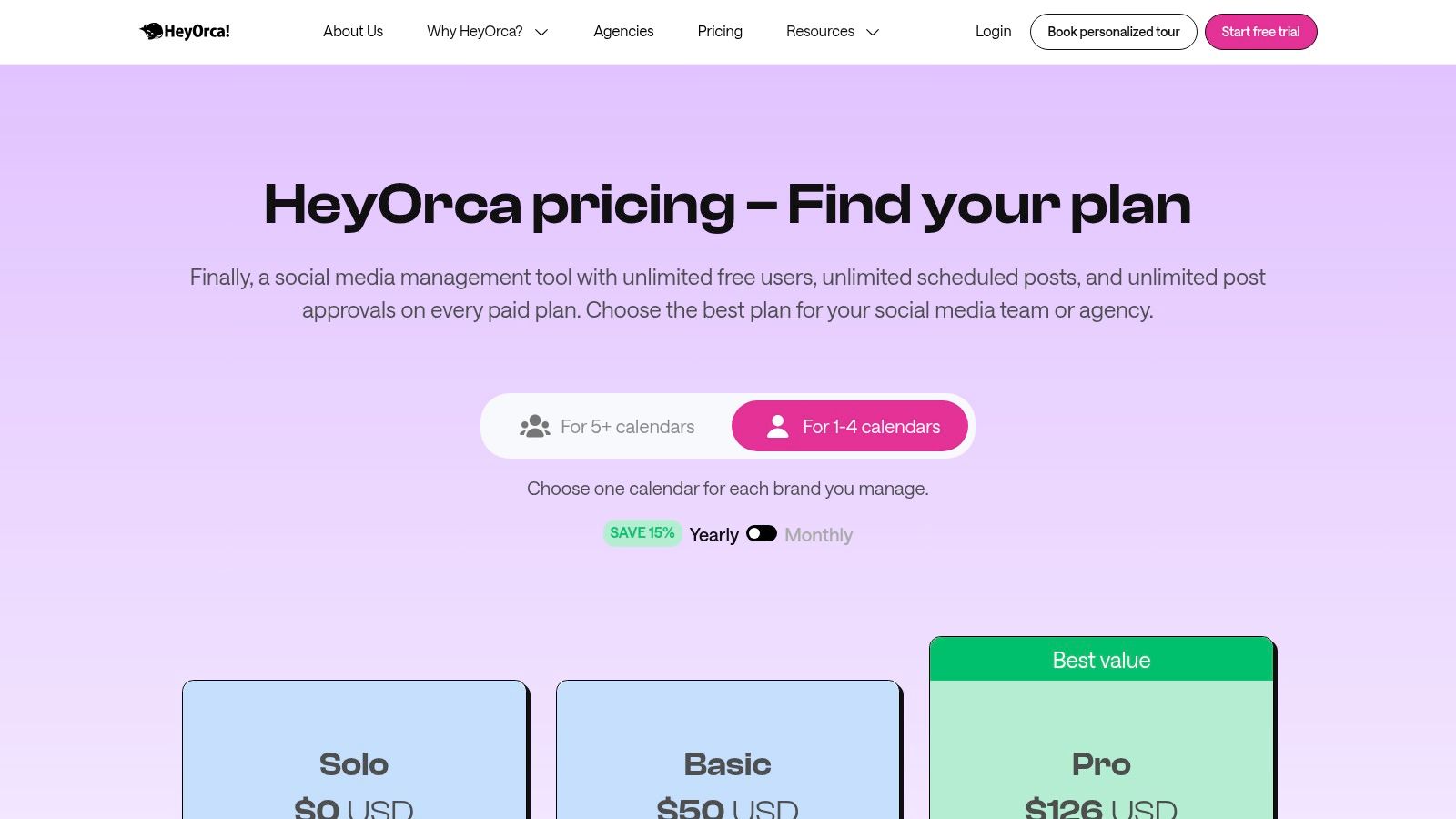
Another key feature is that all paid plans include unlimited users, a major cost advantage over per-seat models. This encourages full team participation without financial penalty. The collaborative content library acts as a central hub for approved media, while AI-powered tools for captions and hashtags help accelerate content creation, making it one of the most practical social media collaboration tools for busy agencies.
| Feature Highlights | Best For |
|---|---|
| Shareable client approval links | Agencies needing fast, no-login client sign-off |
| Unlimited users on paid plans | Growing teams wanting predictable costs |
| Separate client calendars | Managing multiple brands or client accounts |
| AI caption & hashtag tools | Accelerating the content creation process |
Pricing and Limitations
HeyOrca offers a free plan, but it is limited and best suited for solo users. Paid plans are priced per calendar, starting with the Basic plan at $59 per calendar/month. The Pro plan, which adds the social inbox and other advanced features, is $149 per calendar/month. While the unlimited user model is a huge benefit, the social inbox is only available on the highest-tier plan, which may be a drawback for teams needing integrated community management on a budget.
Visit HeyOrca to see plan details.
12. G2
While not a collaboration tool itself, G2 is an essential resource for finding the right one. It's a major software marketplace where you can compare, shortlist, and research hundreds of social media collaboration tools. Using G2 for due diligence is a critical step before committing to a platform, allowing you to validate vendor claims with real user feedback.
Its strength lies in aggregating verified user reviews and providing powerful filtering options. You can sift through platforms based on company size, specific features like approval workflows or a unified inbox, and pricing models. This allows you to create a highly targeted list of potential solutions that match your team’s exact needs, saving countless hours of manual research.
Key Collaboration Features & Use Case
G2 is best used as a research and validation platform during your procurement process. You can access detailed comparison grids that place tools side-by-side, evaluating them on features, ease of use, and quality of support. The platform provides direct links to vendor websites, free trials, and demos, creating a streamlined path from research to testing.
A key use case is checking a tool's reputation and identifying potential red flags. The verified reviews often highlight limitations or user experience issues that aren't mentioned in marketing materials. By reading feedback from businesses similar to yours, you can better understand how a tool performs in a real-world setting, ensuring your chosen social media collaboration tools will genuinely meet expectations.
| Feature Highlights | Best For |
|---|---|
| Verified user reviews & ratings | Validating vendor claims and checking reputations |
| Side-by-side comparison grids | Directly comparing features of top contenders |
| Advanced feature filters | Shortlisting tools based on specific needs |
| Category reports (SMB, Enterprise) | Finding platforms suited for your company size |
Pricing and Limitations
Access to G2's reviews and basic comparison tools is free. However, some of its more in-depth "Grid Reports" and market analysis documents may require you to provide contact information or create an account. A notable limitation is that ratings can sometimes be influenced by vendors who actively encourage their happiest customers to leave reviews, so it's wise to read a mix of positive and critical feedback.
Visit G2 to start your research.
Top 12 Social Media Collaboration Tools Comparison
| Product | Core features | UX / Quality (★) | Value & Pricing (💰) | Target & USP (👥 ✨) |
|---|---|---|---|---|
| REACH 🏆 | Influencer discovery (engagement, demographics), campaign hub, payments, analytics | ★★★★☆ | 💰 Free trial; platform fee ≈ 9% (transparent %) | 👥 Agencies, brands, creators — ✨ white-label campaigns, secure tax‑compliant payouts, ROI-first analytics |
| Sprout Social | Multi-step approvals, unified inbox, calendar, analytics, AI Assist | ★★★★☆ | 💰 Per-seat enterprise pricing (can be costly) | 👥 Mid-market & enterprise — ✨ mature permissions & deep reporting |
| Hootsuite | Scheduling, approvals, shared inbox, integrations, listening | ★★★★ | 💰 Tiered plans + add-ons (pricing complex) | 👥 SMB → Enterprise — ✨ vast integrations & scheduling power |
| Buffer | Simple publishing, per-channel pricing, team collaboration, analytics | ★★★ | 💰 Per-channel modular pricing (economical for small needs) | 👥 Small teams & creators — ✨ very easy onboarding, predictable costs |
| Later | Visual planner, share-for-review, smart scheduling, UGC tools | ★★★★ | 💰 Tiered plans; mid-range for visual tools | 👥 Visual brands & agencies — ✨ visual-first planner + external review links |
| Loomly | Role-based permissions, custom workflows, per-brand calendars | ★★★★ | 💰 Pricing by users/calendars; higher tiers for enterprise | 👥 Agencies & brands — ✨ granular approval controls, client collaboration |
| Planable | Approval-focused workflows, unlimited users on paid plans, multi-view | ★★★★ | 💰 Workspace pricing with unlimited users (predictable) | 👥 Agencies & teams — ✨ fastest feedback/sign-off flows |
| Agorapulse | Unified inbox, publishing calendar, analytics, optional multi-step approvals | ★★★★ | 💰 Transparent plans; per-user on core tiers | 👥 Teams wanting inbox + reporting — ✨ strong support & clear pricing |
| SocialPilot | Bulk scheduling, team roles, white-label reports, flexible limits | ★★★ | 💰 Very competitive / budget-friendly plans | 👥 SMBs & agencies — ✨ flexible account limits & white-label options |
| CoSchedule | Content + social calendar, ReQueue automation, client calendars | ★★★★ | 💰 Agency/plan-dependent; calendar-focused pricing | 👥 Content & marketing teams — ✨ calendar-centric automation |
| HeyOrca | Client review links, collaborative library, per-calendar pricing | ★★★ | 💰 Predictable per-calendar pricing (good for agencies) | 👥 Agencies needing client sign-off — ✨ client approvals w/o login |
| G2 | Verified reviews, category reports, vendor trial links | ★★★★ | 💰 Free access; some reports gated | 👥 Buyers & procurement — ✨ trusted marketplace for shortlisting |
Choosing the Right Social Media Collaboration Tools for Your Growth
We've explored a wide range of powerful social media collaboration tools, from comprehensive management suites like Sprout Social and Hootsuite to client-focused approval platforms like Planable and HeyOrca. Each one offers a unique solution designed to streamline workflows, improve team communication, and bring order to the often-chaotic world of social media management. The right choice doesn't come down to which platform has the most features, but which one is built to solve your team's most pressing challenges.
Navigating this landscape requires a clear understanding of your specific needs. Are you an agency juggling dozens of client accounts? A tool with robust, client-specific approval channels and white-label reporting like HeyOrca or Agorapulse might be your best fit. Are you a small business or solo creator focused on straightforward scheduling and content planning? A platform like Buffer or Later provides an intuitive, user-friendly experience without overwhelming you with enterprise-level complexity.
The key takeaway is that your operational model dictates your ideal toolset. A growing brand’s needs are vastly different from an established agency’s, and the software you choose should reflect that reality.
A Framework for Your Decision
Before you commit to a subscription, take a step back and evaluate your team's core requirements. This internal audit is the most critical step in selecting the right social media collaboration tools. Use this simple framework to guide your decision-making process:
-
Identify Your Primary Bottleneck: What is the single biggest source of friction in your current social media workflow? Is it getting timely feedback from stakeholders? Is it managing multiple content calendars? Is it tracking campaign performance across different channels? Pinpoint this main problem first.
-
Define Your Collaboration Circle: Who needs access to the platform? Your answer will shape the type of tool you need.
- Internal Teams: For collaboration solely between in-house marketers, designers, and copywriters, platforms like Loomly or CoSchedule offer excellent internal planning and task management features.
- Clients & Stakeholders: If your workflow involves external approvals from clients, look for tools with dedicated client portals and simplified feedback mechanisms, like Planable.
- Creators & Influencers: If you work with external creators, your needs extend beyond simple content scheduling. This is a specialized workflow that requires a purpose-built solution.
-
Map Your Budget to Your Goals: Don't just look at the monthly price. Consider the return on investment. A more expensive tool that saves your team 10 hours a week is far more valuable than a cheaper alternative that only solves half of your problems. Align your budget with the scale of the problem you are trying to solve.
When Your Collaboration Involves Influencers
While many of the tools on this list are excellent for managing your owned social media channels, they often fall short when collaboration extends to influencer and creator partnerships. This is where the workflow fundamentally changes. The process is no longer just about scheduling posts; it involves discovery, outreach, negotiation, contract management, content approvals, payment processing, and detailed performance tracking.
This is precisely why a specialized platform like REACH is essential for brands serious about influencer marketing. General social media collaboration tools are not designed to manage the unique lifecycle of a creator partnership. Trying to manage contracts in one place, content approvals in another, and payments through a third system creates inefficiency and leaves you unable to measure true ROI. REACH centralizes this entire ecosystem into a single operating system, transforming a fragmented process into a streamlined, scalable, and measurable growth engine.
Ultimately, choosing the best social media collaboration tools is an investment in your team's efficiency and your brand's growth. By carefully assessing your unique workflow, you can select a platform that not only eliminates current frustrations but also empowers your team to achieve its goals more effectively.
Ready to streamline your creator partnerships and eliminate the administrative chaos? REACH provides the end-to-end platform you need to discover, manage, and measure your influencer campaigns with ease. Start your free trial of REACH today and see how a purpose-built tool can revolutionize your influencer collaboration.
{
“@context”: “https://schema.org”,
“@type”: “BlogPosting”,
“mainEntityOfPage”: {
“@type”: “WebPage”,
“@id”: “https://reach-influencers.com/blog/social-media-collaboration-tools”
},
“headline”: “12 Best Social Media Collaboration Tools for Agencies & Brands in 2024”,
“description”: “Discover the top 12 social media collaboration tools to streamline your workflow. Compare features, pricing, and use cases for platforms like REACH, Sprout Social, and Hootsuite to find the perfect fit for your agency or brand.”,
“image”: “https://cdn.outrank.so/64cdc0e0-2a54-4cd9-a45d-c4196c5e1d4e/screenshots/6edaccd4-93fd-4f5a-aa1c-0dd5d0892b3d.jpg”,
“author”: {
“@type”: “Organization”,
“name”: “REACH Influencers”,
“url”: “https://reach-influencers.com”
},
“publisher”: {
“@type”: “Organization”,
“name”: “REACH Influencers”,
“logo”: {
“@type”: “ImageObject”,
“url”: “https://reach-influencers.com/logo.png”
}
},
“datePublished”: “2024-05-21”,
“dateModified”: “2024-05-21”
}
