
Yes, you absolutely can schedule posts on Instagram. Instagram now supports scheduling for Business and Creator accounts, with native workflows built into the app, and that shift has turned scheduling from a workaround into a normal part of professional publishing.
If you're trying to hit the right posting window while also juggling approvals, edits, client feedback, and the rest of your day, manual posting gets old fast. The struggle isn't typically because Instagram is hard to use. Instead, it's because publishing at the right moment is easy in theory and annoying in practice.
That's why the question isn't just whether you can schedule posts on Instagram. It's whether you should rely on Instagram's native scheduler, move into a third-party tool, or treat scheduling as only one part of a larger campaign workflow.
Yes You Can Schedule Posts on Instagram and Here's Why You Should
If you're still asking can you schedule posts on Instagram, the answer is simple. Yes. And for most professional accounts, you should.
Scheduling helps when the best time to publish doesn't line up with when you're available to post. That happens constantly. You finish the creative in the morning, but the audience is active later. Or you're managing multiple brands and don't want every good posting window to depend on someone remembering to tap “share” on a phone.
Why manual posting breaks down
Manual publishing works for a while. Then the weak spots show up.
- You miss timing windows: Strong posts go out late because someone was in a meeting, commuting, or handling something else.
- You rush the final check: Typos, wrong tags, and sloppy captions usually happen when posting is last-minute.
- You lose consistency: A content plan on paper means nothing if publishing depends on memory.
- You burn time on repeats: Writing, uploading, and publishing one post at a time creates constant context switching.
Practical rule: If posting depends on memory, it will eventually fail. If posting runs on a schedule, it becomes operational.
Scheduling is useful, but it isn't the whole system
There are different levels of scheduling. The Instagram app is fine for straightforward publishing. Meta Business Suite is better when you want a desktop workflow and a calendar view. Third-party schedulers add more control when you manage multiple accounts or channels.
That's also where teams start to notice the difference between publishing content and running campaigns. A scheduler answers, “When does this post go live?” A campaign workflow answers, “Who approved it, which creators are posting, what deliverables are still missing, and what happens after publish?”
That distinction matters more than people expect.
How to Schedule Instagram Posts with Native Meta Tools
Instagram's native tools are the cleanest starting point if your workflow is simple. They're built for Business and Creator accounts, and the process is direct enough that most solo creators, in-house marketers, and small teams can use it without much setup. According to Sprinklr's walkthrough of Instagram scheduling, you can schedule up to 75 days in advance and up to 25 posts per day through supported workflows.
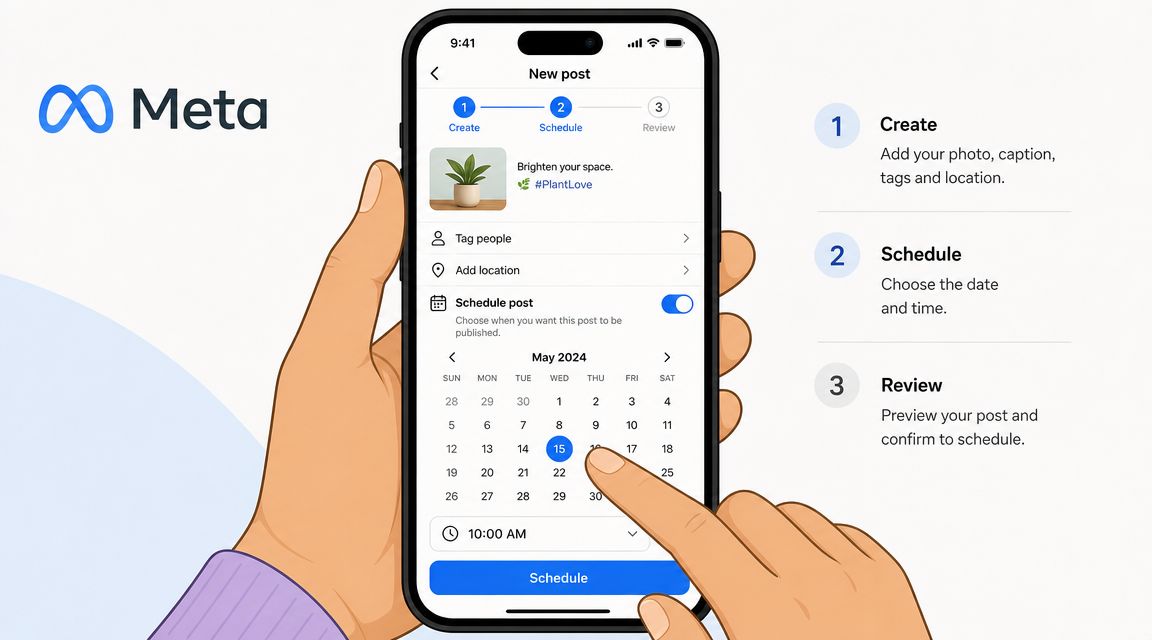
Schedule directly in the Instagram app
If you want the fastest path, use the app itself.
Create your post or Reel as usual. Add your media, caption, tags, and any other finishing touches. Then open Advanced settings or More options, depending on the interface you're seeing. Toggle Schedule this post or Schedule this Reel, choose your publish date and time, and confirm it in Scheduled content.
This method works well when:
| Use case | Native app fit |
|---|---|
| One brand account | Strong |
| Quick mobile scheduling | Strong |
| Last-minute content prep | Strong |
| Team approvals | Limited |
| Multi-account planning | Weak |
The native app is convenient because it keeps everything inside Instagram. The downside is that each post is still handled mostly one by one. Once you're trying to review a full week or coordinate content across channels, the phone-first flow starts to feel cramped.
Use Meta Business Suite when you need a calendar view
Meta Business Suite is better for desktop planning. You can review scheduled content more comfortably, write captions faster, and see upcoming posts in a broader calendar context.
If you're still sorting out account connections first, this guide on linking Instagram to Facebook is useful because those connections affect how smoothly Meta's publishing tools work.
Business Suite is usually the better choice when you need to:
- See the full publishing week: Helpful for launches, promos, and balancing formats
- Work from desktop: Easier for copy review and creative checks
- Coordinate Meta channels: Useful when Instagram and Facebook need aligned timing
- Spot gaps early: A planner view makes empty days and content overlap obvious
A quick visual walkthrough can help if you want to see the interface in action.
Native tools are good at publishing prepared content. They are much less helpful when content needs approvals, handoffs, or coordination across several people.
What native tools do well and where they stop
For straightforward publishing, native scheduling is enough. It reduces missed posts, helps you load content ahead of time, and makes timing intentional instead of reactive.
What it doesn't do well is manage the rest of the workflow. There's no real campaign layer, no strong approval structure, and no broader operating system for creator coordination. If your process is simple, that's fine. If your process is messy, the scheduler won't fix the mess. It will just publish through it.
Using Third-Party Schedulers for More Power
Third-party schedulers make sense when native tools start feeling too narrow. The value isn't that they let you schedule. Instagram already does that. The value is that they make scheduling easier to manage across accounts, channels, and repeated workflows.
CloudCampaign puts the biggest concern to rest in its article on whether scheduling affects Instagram engagement. It states that the Instagram algorithm does not discriminate between a post published manually and one published through a third-party scheduling tool, and that scheduled posts have the same visibility and engagement potential as manual posts.
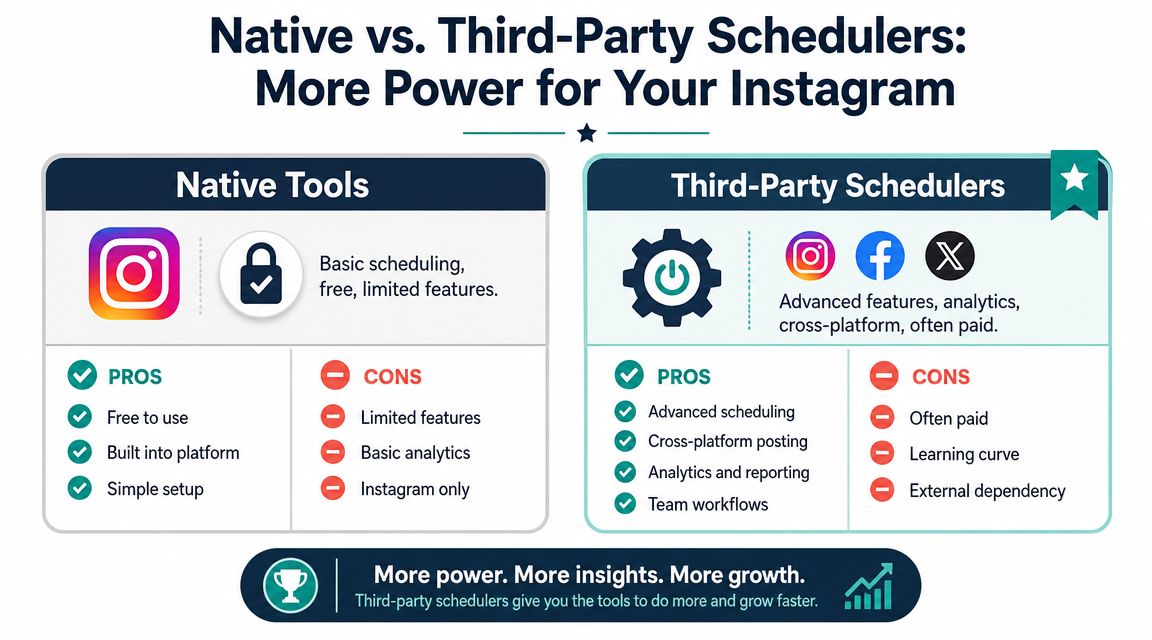
What third-party tools add
The most useful upgrades are operational.
- A visual planner: Better for seeing feed balance before content goes live
- Cross-platform scheduling: Helpful if Instagram is only one part of the content mix
- Asset organization: Easier to reuse approved creative and captions
- Team workflows: Better handoffs between strategy, design, and publishing
- Analytics context: More helpful if you compare scheduling decisions across channels
Tools in this category often work well for agencies and consultants because they reduce repeated setup work. If you're exploring how automation fits into a broader content operation, this guide to AI for social media professionals is a useful companion read.
Native scheduling versus broader workflow tools
A simple way to approach this subject is:
| Option | Best for | Limitation |
|---|---|---|
| Instagram app | Fast, direct posting | Minimal workflow control |
| Meta Business Suite | Calendar planning on desktop | Still mostly manual |
| Third-party scheduler | Multi-account publishing | Requires setup discipline |
Some teams also need a system that connects content timing with campaign execution. In that case, a tool built around social media scheduling software can be more useful when posts need to line up with creator content, launch timing, and follow-up messaging rather than sit in an isolated publishing queue.
Scheduled publishing doesn't hurt performance by itself. Weak content, poor timing, and inconsistent execution still do.
Common Scheduling Limitations and Workarounds
Scheduling solves one problem, but frustrations often start when teams expect it to handle every publishing detail.
A common example is a launch week queue that looks finished on Monday, then needs manual cleanup on Thursday because Story stickers, collaborator settings, tags, or final approvals still have to be checked in the app. The post was scheduled. The workflow was not.
Account access is the first filter
Instagram scheduling depends on using a professional account. If the option is missing, check that setup before you spend time troubleshooting permissions, browser issues, or the tool itself. PostQuick's guide to scheduling Instagram posts covers that requirement clearly.
This sounds basic, but it causes a lot of wasted time.
Publishing support is narrower than the posting calendar suggests
The calendar view can make Instagram scheduling feel more complete than it is. In practice, limits usually show up around the parts of publishing that still need human judgment or platform-specific setup.
Typical friction points include:
- Interactive Story elements: Base creative can be scheduled, but stickers, links, and other interactive touches often need a manual pass.
- Collab posts and advanced post setups: Some formats or partner configurations do not behave consistently across tools.
- Tagging and final review: Posts with multiple tags, location details, or brand checks often need one last look before or after publish.
- Approvals: A scheduler can queue content. It usually does not replace a real approval process for clients, legal review, or campaign signoff.
The practical fix is simple. Split publishing into two steps. Schedule the asset, caption, and timing early, then assign a short QA check close to publish time for the details automation handles less reliably.
Time limits and posting limits still create confusion
Another issue is expectation-setting. Native scheduling is useful for keeping the queue organized, but it has defined posting windows and volume limits, and those details are not always communicated consistently across tools and tutorials. If your team is trying to plan around audience timing, the better approach is to set your schedule inside the actual limits you see in the platform, then compare that with broader timing guidance like Gainsty insights for Instagram scheduling.
That trade-off matters. A scheduler helps you publish on time. It does not manage campaign dependencies, creator coordination, approval chains, or cross-channel timing by itself. That is usually the point where teams realize they do not just need scheduled posts. They need a campaign workflow.
Best Practices for a Strategic Instagram Schedule
A working schedule is not the same thing as a good schedule. Once the mechanics are handled, the job becomes timing, pacing, and consistency.
Buffer's 2026 analysis, based on 9.6 million Instagram posts, found the strongest posting windows were Thursday at 9 a.m., Wednesday at 12 p.m., and Wednesday at 6 p.m. Buffer also reported that 3 to 5 posts per week is a practical sweet spot for reach, plus 1 to 2 Stories per day for consistency, as detailed in Buffer's research on the best time to post on Instagram. For broader weekday engagement windows, Gainsty insights for Instagram scheduling are also helpful as a comparison resource.
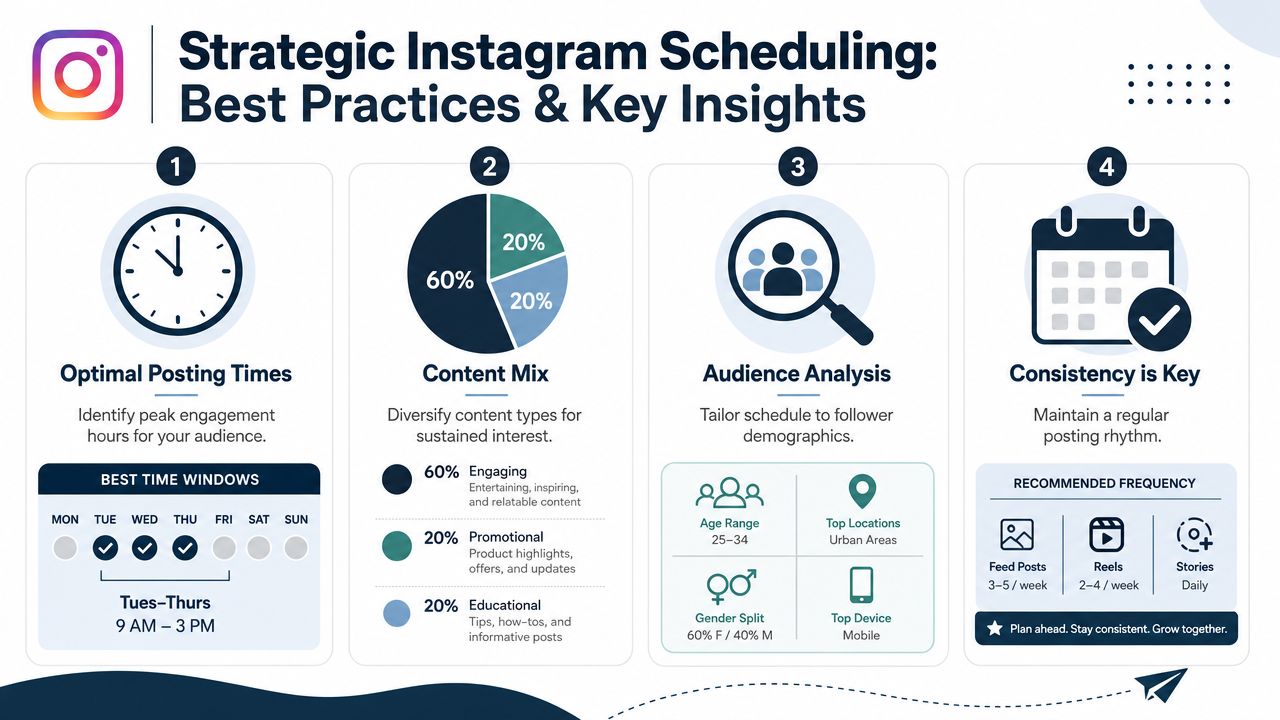
Use timing benchmarks as a starting point
The mistake is treating benchmark times like law. They're a baseline, not a replacement for your own audience data.
Start with strong windows, then adjust by audience geography, content type, and how people respond to your posts. A B2B account, a local restaurant, and a creator with a global audience won't all behave the same way.
Batch content before you schedule it
Teams often get more efficient when they stop creating one post at a time.
Try a simple batching rhythm:
| Work block | What happens there |
|---|---|
| Planning | Pick topics, formats, and campaign priorities |
| Production | Design assets, edit Reels, gather files |
| Writing | Draft captions and final copy |
| Scheduling | Load approved posts into the calendar |
This structure cuts down on context switching. It also improves quality because you're not writing captions while also hunting for assets and checking timing windows.
Keep the schedule consistent, not rigid
Consistency matters. Stiff automation does not.
- Leave room for live posts: Trends, reactions, and timely updates still matter.
- Review the mix: Don't stack too many similar creatives or repetitive captions.
- Stay present after publish: Scheduling a post doesn't replace comment moderation and response.
- Match campaign timing carefully: If several creators need to post around the same launch, a basic scheduler may not be enough to keep everyone aligned.
Good scheduling gives you structure. Good social management still requires judgment.
Beyond Scheduling How to Manage Campaigns with REACH
While scheduling solves the "when," it does not address the "who," "what," and "how" of a full campaign. A content manager can queue next week's Instagram posts in one sitting and still spend the rest of the week chasing creator assets, waiting on approvals, checking whether posts went live, and matching invoices to deliverables.
That is the line between post scheduling and campaign management.
The confusion around Instagram's own scheduling limits makes that gap more obvious. Teams often run into conflicting guidance on how far ahead they can schedule or how much they can queue in a day, and that uncertainty creates process problems fast. If your whole workflow depends on a basic publishing tool, even simple questions about timing can turn into missed approvals, rushed uploads, or creators posting out of sync with the brand account.

Where scheduling ends
A scheduler handles publication timing. Campaign operations require a lot more coordination, especially once multiple creators or stakeholders are involved.
- Content approvals: who reviewed the asset, what changed, and whether the final version is cleared to post
- Deliverable tracking: which creator has submitted, which post is late, and what still needs revisions
- Cross-channel coordination: whether Instagram posts line up with TikTok, YouTube, paid usage windows, or a launch calendar
- Operational admin: contracts, rates, usage rights, payments, and compliance records
That is why teams comparing publishing tools often end up reviewing top influencer marketing platforms instead of stopping at social schedulers. The need changes once the job includes people, deadlines, approvals, and money.
The practical takeaway
A native scheduler can be enough for a solo creator, a small business, or a lean in-house team running a straightforward content calendar. It saves time, keeps posting consistent, and removes some manual work.
The trade-off is scope.
If you are coordinating influencer activations, launch windows, whitelisting, or brand content that depends on creator posts going live in the right sequence, scheduling is just one task in a much larger system. REACH is built for that wider operational job: campaign setup, creator organization, communication, centralized deliverable tracking, payments, and compliance. Scheduling helps posts publish on time. A campaign platform helps the team keep the entire program on track.
If your team has moved past one-off post scheduling and needs a cleaner way to manage influencer campaigns from planning through payment, take a look at REACH. It's built for brands and agencies that need one place to organize creators, content, approvals, and campaign execution without relying on spreadsheets and scattered DMs.